Gunungkidul is our first Free WordPress Theme in 2010, This theme built with 960.gs CSS Framework. We create most unique and simply WordPress Theme ever. There are a lot of featured built in on Gunungkidul.
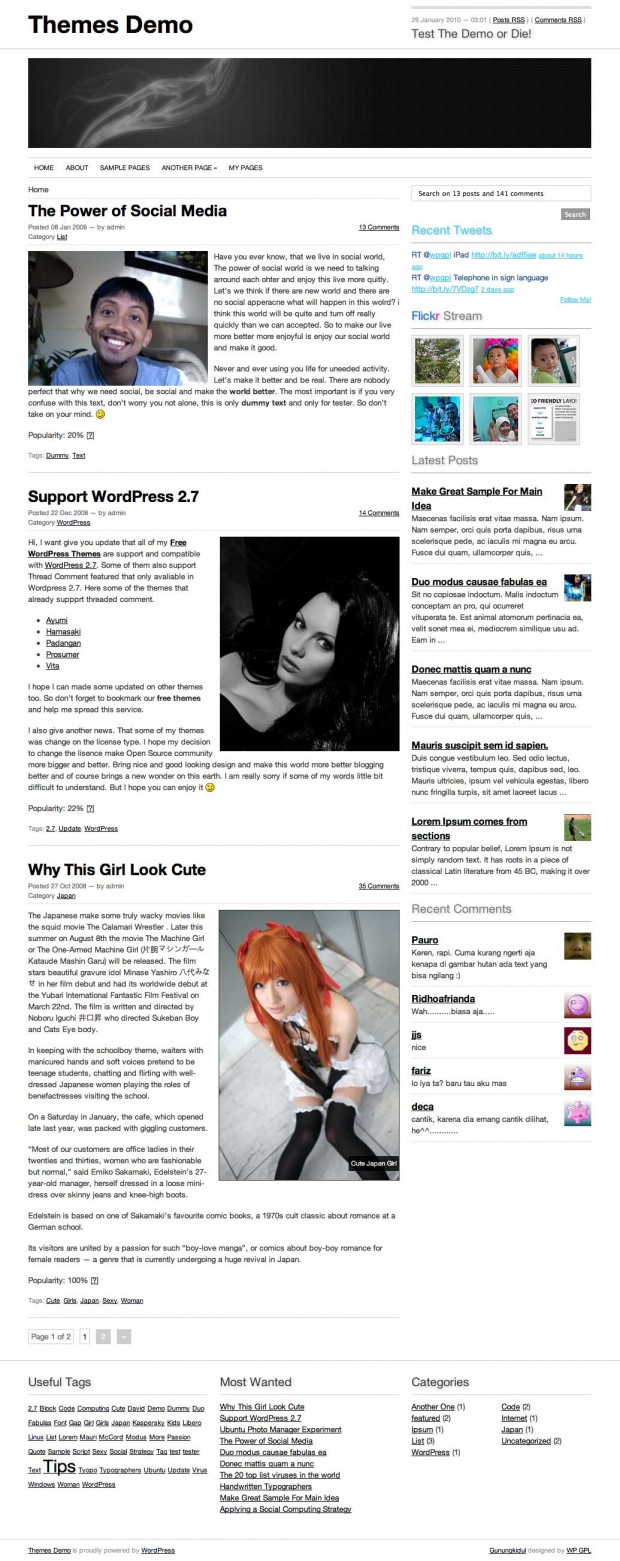 Gunungkidul WordPress Theme
Our main reason why Create Gunungkidul, I need to create something useful and easy to use WordPress Themes. And I have nicely plan, I will released minimally one themes each month in 2010. So if you have some idea, let’s share and we hope we can give the best to all of you.
What’s on Gunungkidul Theme
- 960.gs Framework
- Theme Options (Flickr Photos, Latest Twitter, TimThumb)
- 2 Columns with Extra Footer
- A lot of Widgets
- Simple and nicely fonts
- Hover effect (check the demo for more details)
- sans-serif Family (Helvetica, Arial)
- Page menu with Drop Down Menu
- jQuery
- And many more
- Rewrite WP-Caption using this tricks
- Recent Comment without plugin
- Recent Post with thumbnail (chmod 777 folder cache if you enable this feature)
- AddThis Social Bookmarks Tools
- ver 1.1: You can enabled or disabled Twitter and Flickr trough Theme Panels
- ver 1.1: You can add Twitter and Flickr trough widgets
Old Version
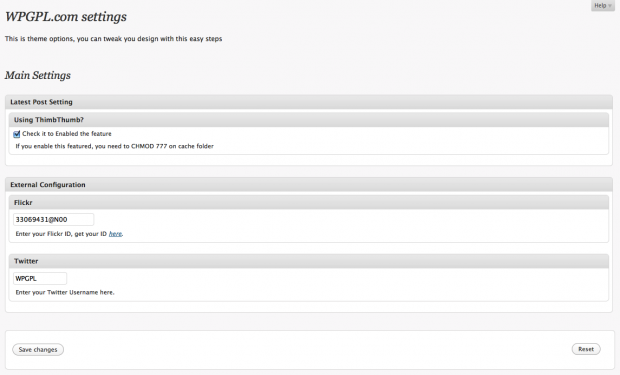 WPGPL.com Theme Options
New Version
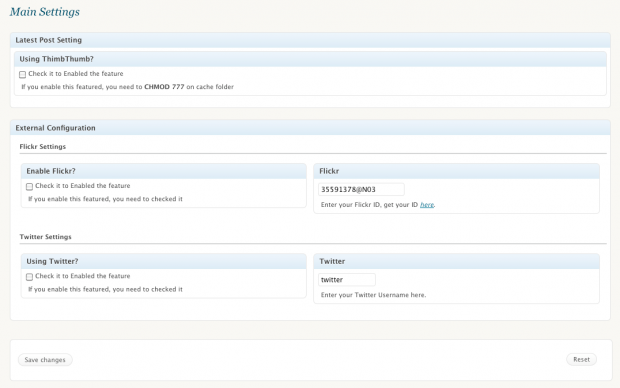 Gunungkidul New Theme Panel
Plugin Needed?
For better experience install this following plugins
Check Gunungkidul Theme demo and if you satisfied with it, please share on 😉
Download
You can download Gunungkidul on WordPress.org Theme Directory or using our links below
[download id=”10″]
Need custom?
Using our contact from.
Releases Notes
- 1.0 : Initial Released
- 1.1 : Fix and Redesigned Theme Panel, Better coding on header, sidebar and footer
- 1.2 : Published on WordPress.org Theme Directory
- 1.3 : Fix Blockquote CSS and Recent comment widget (thanks for Marita to reported this bugs)
Hi. I like your new theme. It’s very simple and clean.
This is what I wanted.
Now I have 1problems and 1queston.
Problem: on right side bar, Title of the 2nd widget is shown in the end of 1st widjet. How can I fix it?
Queston: I want to use favicon of my own,But I couldn’t find any favicon in downloaded files.So please teach me the way to change favicon.
Thank you for your help!
Can you tell me your screen shot problem?
Gunungkidul favicon is generated from your GRAVATAR.com, I will updated on next version using standard favicon
Thank you for your reply.
I understand the favicon’s case.
And here is the screen shot.
http://picasaweb.google.co.jp/lh/photo/VfHpF0iUbUZ35lUFDYb6zw?feat=directlink
please see this.
thank you for your great help!
I am sorry, this is our Gunungkidul bugs, try to download version 1.1 and tell me if you problem has been gone.
GREAT! I appreciate so much.
everything is fine now!
Well done…
Really like your theme, and think it’s just right for my concept art/matte painting site (http://johnuibel.com). Thanks!!
beautiful theme…
I love the clean theme. I’d like to change the header picture, but when I upload a picture the next screen is blank.
Can you please tell me how to fix this or work around it. Is there supposed to be a cropping page after a new image is uploaded?
Thanks!
Maybe you pictures too big?
Also how do you show the recent post with thumbnail? do i need the timthumb script?
Is there supposed to be a Twitter and Flickr widget since there are those options in the control panel?
The flickr and twitter widget not available this moment, but if you keep your right sidebar unchanged you can see latest post with thumb, flickr, recent comment with gravatar and latest twitter.
I upload a different picture and the custom header now works. However, I still can not get the latest posts with thumbnails to show. Can you provide more details on how to enable that feature?
I noticed that this theme does not have post thumbnails as an option when I create or edit any of my posts, i.e. it is not part of the theme template. Can this be added since it is supported with WordPress 2.9.1?
Hi Rolando, Disable all of you widget and doesn’t it work?
Oh I see. I did not do that because there are widgets that I want to enable.
If you want keep you current widget. Please modified sidebar.php with this code
</div> <!-- #content-area --> <div id="sidebar" role="complementary" class="grid_8"> <ul class="gap"> <li class="search"> <div class="cari"> <?php get_search_form(); ?> </div> </li> <?php if ( is_404() || is_category() || is_day() || is_month() || is_year() || is_search() || is_paged() ) { ?> <li> <?php /* If this is a 404 page */ if (is_404()) { ?> <?php /* If this is a category archive */ } elseif (is_category()) { ?> <p class="infos">You are currently browsing the archives for the <?php single_cat_title(''); ?> category.</p> <?php /* If this is a daily archive */ } elseif (is_day()) { ?> <p class="infos">You are currently browsing the <a href="<?php bloginfo('url'); ?>/"><?php bloginfo('name'); ?></a> blog archives for the day <?php the_time('l, F jS, Y'); ?>.</p> <?php /* If this is a monthly archive */ } elseif (is_month()) { ?> <p class="infos">You are currently browsing the <a href="<?php bloginfo('url'); ?>/"><?php bloginfo('name'); ?></a> blog archives for <?php the_time('F, Y'); ?>.</p> <?php /* If this is a yearly archive */ } elseif (is_year()) { ?> <p class="infos">You are currently browsing the <a href="<?php bloginfo('url'); ?>/"><?php bloginfo('name'); ?></a> blog archives for the year <?php the_time('Y'); ?>.</p> <?php /* If this is a search result */ } elseif (is_search()) { ?> <p class="infos">You have searched the <a href="<?php bloginfo('url'); ?>/"><?php bloginfo('name'); ?></a> blog archives for <strong>'<?php the_search_query(); ?>'</strong>. If you are unable to find anything in these search results, you can try one of these links.</p> <?php /* If this set is paginated */ } elseif (isset($_GET['paged']) && !empty($_GET['paged'])) { ?> <p class="infos">You are currently browsing the <a href="<?php bloginfo('url'); ?>/"><?php bloginfo('name'); ?></a> blog archives.</p> <?php } ?> </li> <?php }?> <?php if ( function_exists('dynamic_sidebar') && dynamic_sidebar('Sidebar')); ?> <div class="twit boxr"> <h3><span>Recent</span> Tweets</h3> <div id="twitter"> <ul id='twitter_update_list'></ul> </div> <a href="http://twitter.com/<?php if(!get_option('ppm_twitter')) { echo 'jauhari'; } else { printf(get_option('ppm_twitter')); } ?>" title="Follow me on twitter"><span id="followme">Follow Me!</span></a> </div> <div id="flickr-stream"> <h3 class="lite"><span class="flick">Flick</span><span class="r">r</span> Stream</h3> <hr /> <div class="clear"></div> <div id="flickr"> <noscript>Your message for people w/o javascript enabled goes here.</noscript> </div> </div> <?php if(get_option('ppm_timthumb')): J_ShowRecentPosts(); else: J_ShowRecentPosts2(); endif; ?> <li class="therecent"> <h3 class="lite">Recent Comments</h3> <ul class="recent-comment"> <?php $comments = get_comments('number=5'); foreach($comments as $comm) : $url = '<a href="'. get_permalink($comm->comment_post_ID).'#comment-'.$comm->comment_ID .'" title="'.$comm->comment_author .' | '.get_the_title($comm->comment_post_ID).'">' . $comm->comment_author . '</a>'; ?> <li> <?php echo get_avatar($comm->comment_author_email, 45); ?> <h3><?php echo $url; ?></h3> <p><?php echo $comm->comment_content; ?></p> </li> <?php endforeach; ?> </ul> </li> </ul> </div>Excellent that works! Thank you! I’ll just adjust the order and it will be perfect for me. Appreciate your help!
Gunungkidul latest version (1.2 up) built in with Recent Comment and Recent Post widget.. so you can using widget without any worries and put the Recent Post or Recent widget in every widget area…
hi I want to adjust the clock on top to Japanese time zone.Because my site is for viewers in japan. so please tell me how to change it.
Thank you.
What you mean clock on top? Can you tell me more details? and what kind time zone that you need to change? The Header time info is taken from server time..
Yes I would like to know how to change that too. I am on Pacific Time (GMT -8:00)
excellent work!
jadi pengen nyoba nih!
simple themes and cool
i like it..
thank you
4 jempol dech pakde