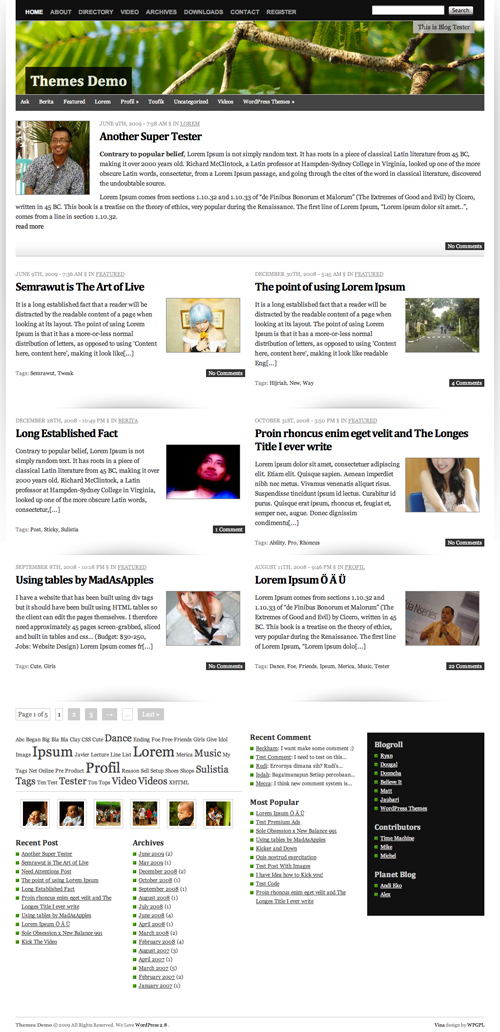
Vina WordPress Theme is extra ordinary layout wordpress theme. The behind story, why I gave the name of this theme Vina is, Vina name taken from my latest dream car Grand Livina, that why I want to make something easy to remember and useful for some one else. That why I create Vina wordpress theme.
On Vina, it try to use 1 line CSS Framework, this is powerful and simple CSS Framework all of the time, thanks for sharing this Framework 😉
This theme built in many nicely featured such as
[adsense]
- Auto Grabbed and Resized Image on the fly
- Nicely 2 Columns content with latest featured post
- A lot of widget
- Page Comment
- Grid Based layout
- Threaded Comment
- Work Perfect on WordPress 2.7 and WordPress 2.8
- Extra Ordinary layout
- Magazine Style
- Nicely Typography
- Header Effect with jQuery
- Image Header
- FlickrRSS Plugin
- Popularity Contest Plugin
- and many many more
Download Vina
You can download Vina on this server or on WordPress Theme extend
- [download id=”9″]
- Vina: Free WordPress Themes directory
Localization
- Vina in Indonesia version by Ivan Lanin
[download id=”15″]
Vina Demo
You can check Vina WordPress Theme demo
If you enjoy and like Vina WordPress Theme, you can help me spread this theme.
Change Logs
1.0 : First Public Released
1.1 : Fix Minor Error on the Header
1.2 : Fix Minor Problem
1.3 : Fix Auto Grabbed image and Hidden No Image when no image uploaded and Search page and add RSS Icon
How To and FAQ / Vina instructions
Many blogger ask the some question, and I tried to explain more clearly as I can do,
No Image Problem?
Vina is built in Auto Grabbed image, this code is searching image files on the content and display on the front page with TimThumb. But if you want using custom field, it’s easy just put you image url on custom field “thumbnail” (available on version 1.2 and newer) and the image will be used for image post in the front page, and if the post without any image, the auto grabbed image will be switch off 😉
Change Custom Image Header
To change default image header, go to Apperance > Custom Header and upload your own image.
Future Released
- Theme Options (hola)
- Tweak Single Post
- Have suggestion? (leave some feedback on this post)
Hello,
where can I set it off, that the header Headline text will be invisible, when I track the mouse over the header?
Thanks
Do you want remove this effect permanently or? Keep the Header ON?
I want that the Text over the Header Image ist permanently visible and that there is no mouse over effect.
What I have to do?
Nice theme but it doesn’t show the “thumbnail”. Does not work.
Where in the code did you implement ads to appear on right side of comment pages? Also, I noticed that the main article on home page is an excerpt that continues on interior page, how is this done?
I have been very impressed with this theme however it is not very ad friendly.
Modern Hippie,
I can answer the excerpt question: there is an icon on the toolbar – you should have two lines of icons (bold, underline, italics, etc.) One of them is called “insert more tag”. You just click it and decide where you want the excerpt to break. You’ll see “read more” or continue or something like that. It looks like a skinny box with a broken line and then a square box. It’s right next to my spell check icon. If you can’t see all of your icons, click “show/hide kitchen sink. I experimented with each button to find out what I was missing. Have fun with your “read more” tool!
Cheryl
Thanks so much Cheryl!!! I appreciate your responding more than you know! Congrats on the contest!
Jaszy
How do I delete the “Register” tab?
I just updated to Vina 1.3 and I hate it. Is there anyway to get 1.2?
What you mean hated version 1.3? why hated that version?
Hi…love the theme. I would love to be able to use the following plug-in (http://nicasiodesign.com/blog/wordpress-plugins/our-first-public-wordpress-plugin-dynamic-headers/), or something like it, so that the header image can be different on different pages of my website. Is this possible? If so, where should I drop the suggested code in the header to make it possible? thanks!!
To make this plugin work on your blog. You need to edit it on header.php file on Vina theme
Hi
Love the theme but cannot make images appear for posts on the home page.
Help
Also how do i get the flicker RSS? Is it one of the widgets?
Thanks
Kate
Hi, I like vina very much and it’s really beautiful. However I met 2 questions when using it:
1. How to manage the picture pixel when it was automatically grasped by the theme? I found the picture appearing in homepage is too big or not the middle so it’s blur.
2. WHen I add the widgets, they were one by one listed in the end of the page, not in one row, which makes my page looks too long. HOw to solve it?
THanks,
1. Try to use vina on WPGPL.com version.
2. I didn’t understand what it mean sorry, more clearly please
Instead of answering all of the e-mails indivually, I figured I would just address everyone here.
I really appreciate that so many people have e-mailed me to say how much they like the way my site looks. However, to answer all of the questions, I am sorry to say that I have little to no computer language skills.
I spent one weekend using trial and error to make everything work until I got it to look like I wanted.
The good news is that if I can do it, 99% of the people who post here can. I’m a writer, not a computer guy. And, as they say, what has been done, can be done.
If you really can’t figure it out, and you have tried everything, let me know. I’ll do what I can.
Sean
PS: Regarding post 25, if I understand your problem correctly, you need to copy and add /wp-admin/widgets.php to the end of your web page when signed it. Where it say, “sidebar left,” etc., that’s for the bottom of the page. If you split up your widgets among the different sidebars, they should even out. Look at the bottom of my home page (www.itsjustmovies.com) to see if that’s what you are trying to do.
Jauhari,
How do I change the wording so that when there are No Comments, it says “add comment” instead?
I notice that you have “no speaks” on yours. Where did you make that change?
Thank you,
Cheryl
Change it on comments.php
Juahari,
Thank you for the answer – to change something in comments.php but it’s not clear to me…
To change the wording in appearance – editor – comments.php, which line do I change?
comment_status) : ?>
It’s not so easy for me to see where to change it. Maybe I should leave it alone! 🙂
Cheryl
Hello,
one question:
I want that the Text over the Header Image ist permanently visible and that there is no mouse over effect.
What I have to do?
Studied the whole site wpgpl.com for 3 days. And finally used it for my personal blog at http://blog.ekendraonline.com .
This is because I was having problem with many other themes that I used.
Vina is a wonder theme. However, still some tweaks are missing. Specially the link colors and widgets, it’s not ad friendly.
Hope future release of Vina will address much more.
Thanks.
First off, what an awesome theme! I’ve got a few questions for you though. I’m having a problem with the front page, some of the block post are missing. How do I fix that?
My second question is, how can I change the color of the heading for each post. Currently they are black titles, I would like them to be a blueish color.
If you go to my site, you’ll see clearly what I’m talking about. I’ve managed to change the main post tile to the blue I like.
Please help, thanks in advance!
mas….susah banget edit css-nya…bingung nyari2nya….
Hi,
I am using this theme and I love it, it’s so simple to use so thank you for designing it! I am wondering, however, can you somehow remove one category from appearing on the main page, but still have the link to it in the menu bar under the header? If you look at my site I am trying to do this with the ‘trailers’ category.
The auto-resizing is not working for the thumbnails on my home page. Could you, step by step, please explain how to fix this? Thanks
Juahari,
I’m running a contest for 6 weeks and I expect to receive a lot of comments. I installed Intense Debate (a WP plug-in). I loved it! It shrunk the comments and took up less room in the sidebar. However, it TOOK OVER the entire column and overlaid on top of everything that was previously there. Like a blanket, it covered everything in the entire column up. I uninstalled it.
How do I move the comments so they line up like yours. Move the comment code to page.php or style sheet? Maybe I’ll try it. Uh oh. Better copy all the code before I mess with anything. Wish me luck.
Thanks,
Cheryl
What I meant to say was, how do I get the comments underneath the post like this instead of along the side?
Thanks,
Cheryl
Juahari,
I added the following text to the end of my post when asking for comments because 5 (five) people have told me all they see is an empty white box below my post (right column is longer than post sometimes) and they don’t know how / where to leave a comment. It’s because they are used to seeing comments below the post not over on the side so they don’t even look.
“Please share your thoughts in the comments section (located to the right of this post, not underneath like most blogs).”
Should I move the comment text from “Comments” to “Single Post”? If so, exactly where should I paste it?
Thanks,
Cheryl
Sorry – forgot to leave the link so you can see what I mean:
http://thatgirlisfunny.com/2009/10/51-must-know-habits-for-staying-young-%E2%80%93-from-the-inside-out/
Two people told me (TODAY) they couldn’t find the comments even though there are (7) seven comments displayed in the right-hand column. 🙁
I want to make it easier for people who are rushing or not paying attention.
Thank you,
Cheryl
Juahari,
I’ve moved the blank comment box underneath (yay!) but how do I get live comments underneath (like yours)? I copied and pasted all of the code related to comments to the single post page, but live comments aren’t showing up underneath. Is there something easy for me to do?
Thank you!
Cheryl
this is the link to the page that is causing this question. I’m running a give-away and asking people to leave comments. I’d like the comments to be underneath – for some reason, people are telling me they can’t find the comments – I think it’s because they’re not used to looking for them on the side.
http://thatgirlisfunny.com/2009/10/51-must-know-habits-for-staying-young-%E2%80%93-from-the-inside-out/
Whatever the reason, I hope moving comments below resolves the issue. Please respond! Thank you!
Cheryl
Hi
Great Theme, but i have a problem with the categories. The Theme don`t show all categories under the header. If i have more than 7 categories, i can`t see the other. Can i make it visible?
thanks
Peter
Tell me your URL please.. so we can check it…