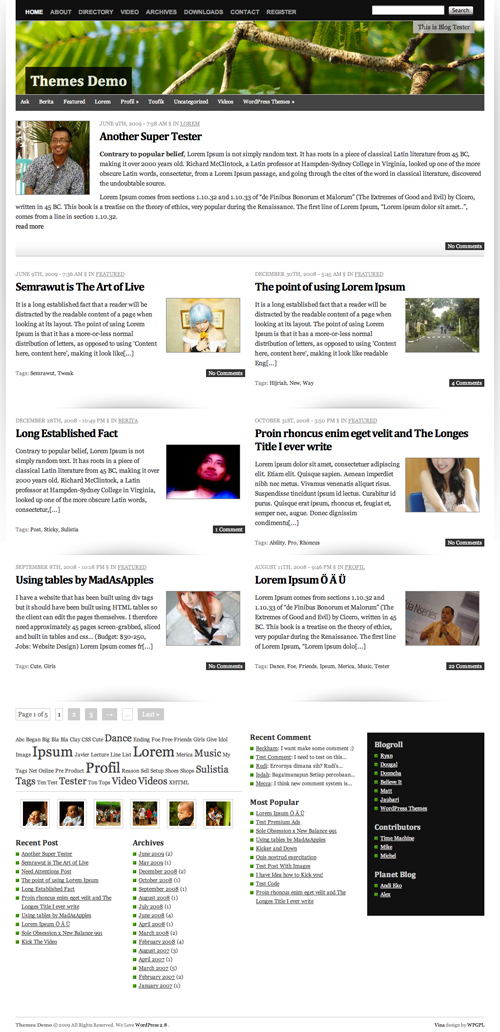
Vina WordPress Theme is extra ordinary layout wordpress theme. The behind story, why I gave the name of this theme Vina is, Vina name taken from my latest dream car Grand Livina, that why I want to make something easy to remember and useful for some one else. That why I create Vina wordpress theme.
On Vina, it try to use 1 line CSS Framework, this is powerful and simple CSS Framework all of the time, thanks for sharing this Framework 😉
This theme built in many nicely featured such as
[adsense]
- Auto Grabbed and Resized Image on the fly
- Nicely 2 Columns content with latest featured post
- A lot of widget
- Page Comment
- Grid Based layout
- Threaded Comment
- Work Perfect on WordPress 2.7 and WordPress 2.8
- Extra Ordinary layout
- Magazine Style
- Nicely Typography
- Header Effect with jQuery
- Image Header
- FlickrRSS Plugin
- Popularity Contest Plugin
- and many many more
Download Vina
You can download Vina on this server or on WordPress Theme extend
- [download id=”9″]
- Vina: Free WordPress Themes directory
Localization
- Vina in Indonesia version by Ivan Lanin
[download id=”15″]
Vina Demo
You can check Vina WordPress Theme demo
If you enjoy and like Vina WordPress Theme, you can help me spread this theme.
Change Logs
1.0 : First Public Released
1.1 : Fix Minor Error on the Header
1.2 : Fix Minor Problem
1.3 : Fix Auto Grabbed image and Hidden No Image when no image uploaded and Search page and add RSS Icon
How To and FAQ / Vina instructions
Many blogger ask the some question, and I tried to explain more clearly as I can do,
No Image Problem?
Vina is built in Auto Grabbed image, this code is searching image files on the content and display on the front page with TimThumb. But if you want using custom field, it’s easy just put you image url on custom field “thumbnail” (available on version 1.2 and newer) and the image will be used for image post in the front page, and if the post without any image, the auto grabbed image will be switch off 😉
Change Custom Image Header
To change default image header, go to Apperance > Custom Header and upload your own image.
Future Released
- Theme Options (hola)
- Tweak Single Post
- Have suggestion? (leave some feedback on this post)
Hi, Thank you for the wonderful format. Is it possible to remove the tag cloud at the bottom of articles? I find it unsightly.
Thanks,
Jason
LOVE YOUR THEME!!! it´s perfect!
Hi! Just want to say, great great job on the theme. As I am customizing it, can I ask you how do I change the font size of the sidebars and the color of the green square infront of a list?
That would be very helpful,
Thanks!
Jen
Thanks for a great theme.
I am going to use Vina for a BBQ products catalog so the home page is perfect for my “Featured Products” page with brief description and image.
The one thing I wanted to do was change the header image size to make it a bit deeper and searched everywhere to find how to do this.
Finally I found a hint (and lots of other good advice) in the comments discussions.
To add some depth to your header image go to functions php (I’ve changed mine to 300px high from 150px) and edit ‘HEIGHT’:
//* HEAD
define(‘HEADER_IMAGE’, ‘%s/images/header.jpg’); // %s is theme dir uri
define(‘HEADER_IMAGE_WIDTH’, 960);
define(‘HEADER_IMAGE_HEIGHT’, 300);
define(‘HEADER_TEXTCOLOR’, ‘FFF’);
I thought to add this comment to save others some time.
cheers
Hi, I downloaed your theme and is perfect for my site, but there is a big problem (for me) the sticky post doesn’t function! I simply want the same post always on front page and in first position…
But the option in post screen doesn’t function, could you give me an advice?
thank you
Demian
Hi, why can’t I translate this theme to Spanish? I did it in POEdit, uploaded the es_ES.mo and es_ES.po to both the theme’s language folder and the wordpress language folder, but the theme is not translated. Please help!
Marta
I am really sorry Translate not available right now
Beautiful theme, but it desperately needs sticky support.
i will try this themes thanks
Thanks for those great theme…May I try to use this one?
I need the simple and fresh theme for my blog.
I like this theme….it’s looks cool and interesting.But I needed a theme with 3 columns?
Can you help me,please?
This theme looks cool and interesting, where i can get this theme?
Please help me!!
How can I increase the number of posts shown on an archive category page?
thank you for these cool theme
very good theme i like it very much i wanna try on my blogs thanks
I find theme like this.
like magazine theme, may be I use for my blog.
Thank you so much.
I LOVE the Vina theme. HOWEVER, I’m trying to insert a 960 pixel wide pic into a page, and it keeps squishing the photo to about half its size and placing it on the left side of the page.
Anyway to disable this?
Any Screenshot about your problem?
Sure, MiracleWebsites.com. I’ve tried making the image ~900 px wide, just in case the width was causing this, but no luck.
Thx,
G
I was also wondering if there’s a way for me to make a page template that will let me control everything between the header and footer.
Malam mas, izin pake theme nya….tks