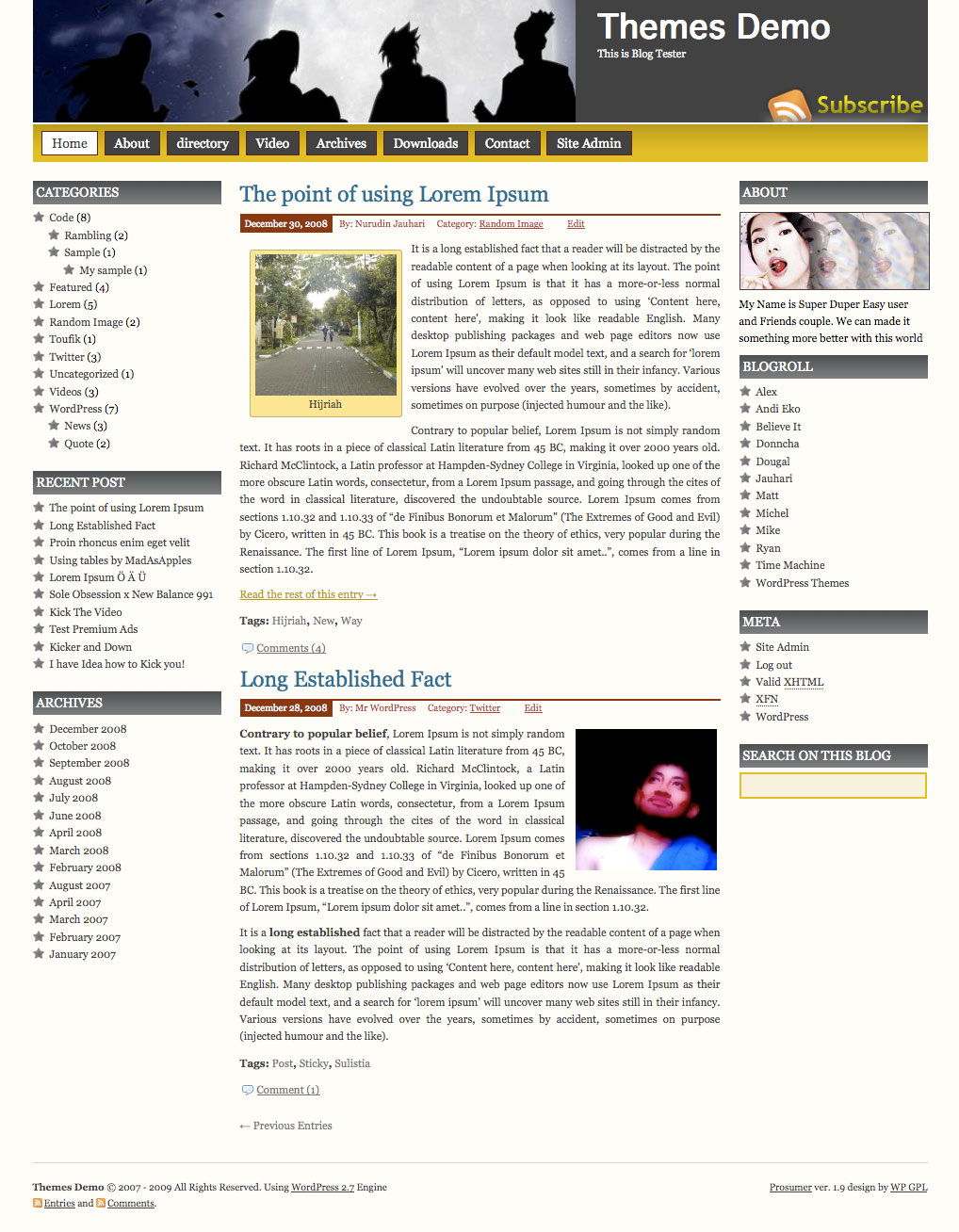
Prosumer WordPress Theme, is popular wordpress theme that develop by Nurudin Jauhari. After long time with Creative Commons license, Nurudin Jauhari decided to move to GPL Licence theme. Because of that fact. Nurudin Jauhari move theme hosting to WP GPL. We hope after Prosumer hosted on WP GPL, this theme will be got more user and better support.
[adsense]
What’s on Prosumer
- Right and Left Sidebar
- Widget Ready
- Custom Header
- Change About text via Admin Profile
- Threaded Comment
- WP-Comment
- Tested on WordPress 2.1.x, 2.2.x, 2.3.x, 2.5.x, 2.6.x and WordPress 2.7
Download
You can Download Prosumer on this post or from Free WordPress Themes Directory
- [download id=”4″]
- Prosumer on WordPress
Demo
Check Prosumer Demo for test drive this theme
I just imported the Prosumer theme and the “link” widget in WP that lets me display my blogroll is inactive. Why is that?
Love your theme… had issues with the titles of the RSS feeds being too dark. Found someone to help me with it. Aside from that issue it’s a great theme.
I just uploaded the theme Prosumer into my website. It looks great. How can I change the ‘ABOUT’ image. I can add text but it is not possible to change the image.
Thanks
upload your own pic to replace “you.jpg” in the image file of prosumer the pic is 200 X 80 pixels and call it you.jpg
If you use WordPress go to the theme folder and find the images folder… the image is named “you.jpg” so just swap it with another picture the same size, name it “you.jpg” and replace the current file with the new one.
…so the description is user specific but the image is static, correct?
Yes.. you are right…
What if the blog is the free one hosted by WordPress? How do I change the you.jpg image? I don’t have any access to the directories. Thanks!
I started to use your great prosumer theme, but I didn’t found where to change the texte of “about”.
Thanks to help me.
Login to your admin account and change the About text for the user profile. OR create a Text widget and install it on a sidebar.
Hey Isara:
I’ve looked and looked and can’t find my “admin acct” to change the About text. Where is it hiding? Is it in my WP dashboard? thanks. Also, how can I get access to change the rest of the links on the right sidebar? I can’t find that either.
Thanks so much.
And second question, how could we change the favicon in the blog adress.
Thank you
create a 16×16 favicon.ico image and upload it into the prosumer theme directory on your server.
Man! Looks cool! Thanx!
Fabulous theme. I love it very much! But I’m trying to remove the right sidebar (or create another template for the pages that only has a left-column display). What’s the best way to do this? I am not at all familiar with PHP, and I believe I need to change something in the Page Template, but I don’t want to blow up my site by messing around with the Template.
Some handholding would be much appreciated!
Hi Sara i had the same problem as i had written in the below post .This is how i fixed it.i am using wordpress 2.7.Go to Dashbord then editor then to your right look for sidebar and click on it and the code will appear in the screen.
now all you need to change is word Left to Right after the word Sidebar as i have it in the above code.After you do this there is another similar code in the middle of the page change this from Right to Left.Click on update file or save depending on your word version and you are done.Hope this helps.You can click om my web and see the results
The search widget just appears as a yellow box but there is no indication that it is a search box. How can I get a title like “Search” to appear?
On mine, I added text just above it with the random text widget that says “search”.
I really love the theme too. I also have the problem with the RSS feed titles being too dark. How can I fix this? Thanks.
I am having the same problem like Sara is having,i would like to move the sidebar to the right also.i edited the sidebar to move to the right.But the result was the sidebars disappeared completely.How can i fix this.I love the Theme otherwise.
If i add any widgets to the right column the about image and descrip disappears. Is there any way to keep that there while customizing the right column?
how to i remove or adjust the sidebar in this amazing theme?
iv only just stumbled on to wordpress and dont know much about php, i want to change the picture of the women and other stuff…it says If you want edit me? just go to your profile than add description text as many you like. ^_* what?? i dont get it??
This Theme is fantastic, I like it. However, when I added other widget on the right sidebar, the ‘about image and text’ on top right corner disappeared. How can I resolve that?
Thanks,
Josh
I also use this amazing theme but I have two main issues:
1) As more users whenever I add a widget to the right sidebar everything else (about etc) disappear.
2) Is there any way to post the Time of a blog post next to the date ?
Thanks and keep up the good work!
Hello!
I’ve got a problem with this theme. The files was coding ANSI but my languages charecter set is UTF8, please create an other theme with UTF8 coding. Thanks
What is the plugin name of the “reply” buttom?
It’s not the plugin, it’s WordPress 2.7 featured
Hello,
I have forked your theme and made some edits of my own. I have posted it to my github repo:
http://github.com/jforman/prosumer/tree/master
-Jeff
I replaced the jpeg in the about section, but instead of my lovely face appearing, I see a placemarker. Then I decided to forget the pic and just have text. So I deleted the pic. I still have the placemarker. How can I get rid of it?
The text widget is stright html so you can put anything there but you have to have correct html.
I put a form there to collect paypal money.
to get the picture don’t put it in your themes image folder put it in the first folder where wp-content is and make sure you have the complete url as follows:
the html code didn’t show because it’s html so here it is without the start and stop tags ‘img src=”http://www.yourwebsite.com/youpic.jpg ‘