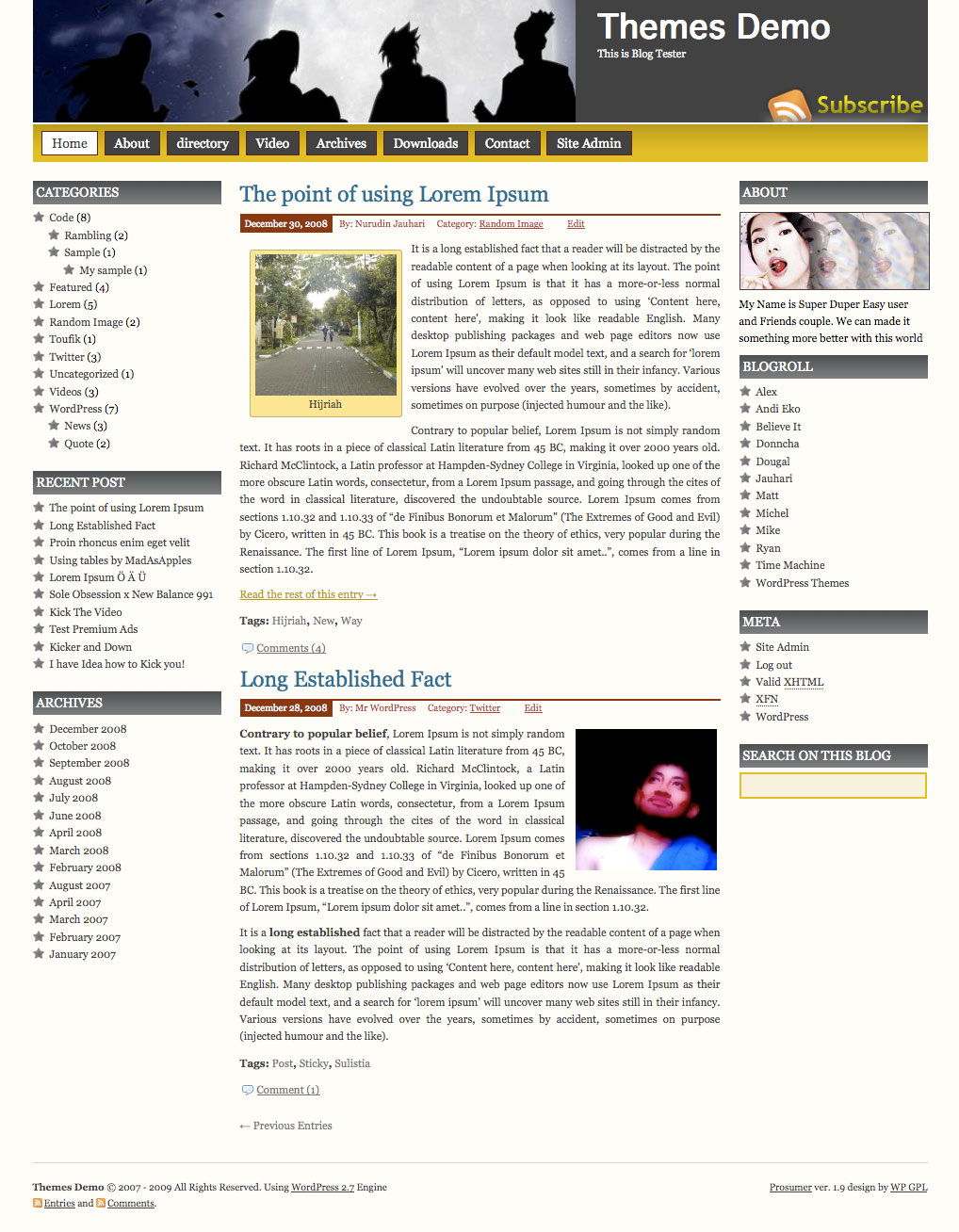
Prosumer WordPress Theme, is popular wordpress theme that develop by Nurudin Jauhari. After long time with Creative Commons license, Nurudin Jauhari decided to move to GPL Licence theme. Because of that fact. Nurudin Jauhari move theme hosting to WP GPL. We hope after Prosumer hosted on WP GPL, this theme will be got more user and better support.
[adsense]
What’s on Prosumer
- Right and Left Sidebar
- Widget Ready
- Custom Header
- Change About text via Admin Profile
- Threaded Comment
- WP-Comment
- Tested on WordPress 2.1.x, 2.2.x, 2.3.x, 2.5.x, 2.6.x and WordPress 2.7
Download
You can Download Prosumer on this post or from Free WordPress Themes Directory
- [download id=”4″]
- Prosumer on WordPress
Demo
Check Prosumer Demo for test drive this theme
I LOVE this theme! I am a beginner but have been able to tweak the theme and make it look and work for my needs! I found an issue by chance while visiting a relative…my sidebars fall to the bottom in IE6 (and lower I assume). I did a little research but was wondering if there is a quick fix (or at least manageable fix) for me as a beginner? Thanks!!
loving Prosumer too, thanks for the template, it fits right into my design.
I have this same issue as Michelle, working to find a fix, any help would be appreciated!
Why is the archive link inactive on my dashboard and how do I make it active? Everything else works beautifully, but would really like to have that archive list
Nice website Rebecca!
You right banner too big but nice custom Rebecca 🙂
Hi Rebeca, nice site. Question, how, where did you add the information to the gray block in the header where it reads “Alvah’s Books, Book Reviews, Essays, and Author Interviews.” Thank you in advance for your assistance.
I love your theme! I have a javascript error though on even the first page. Can’t seem to locate it … similar to the one on this page … it is a Prosumer theme thing I should just deal with?
wordpress document.getElementById( is null or not an object
Ta muchly!!!!!!!!!!!! 🙂
Thanks Andrew and WPGL! It’s all about my BIG ego. Seriously, I couldn’t make it any smaller and I was grateful that it was working so I didn’t want to fuss around too much with it. So I left good enough alone.
But why is my archive link inactive? What do I need to do to make it active?
how do i place google ads below the sidebars or in the main text?
Hi Nick
On the sidebar you can do it with widget, on the main text you need edit the theme files
Hello
I have just joined wordpress and am testing my site with this Theme. It works fine in admin panel and links to site, but when i am logged out of WP the theme of this site goes back to the WP default. Why is this?
I was check your blog and the Prosumer display correctly. So what the problem?
I love this theme! I just started playing with it and making it fit my site look… Im not familiar with coding though, and i’m having an issue with the title of my blog (on the template, where it sames Themes Demo) If you go to my page, you’ll see that the ”Forum’ is too close to the top line, ‘Give & Get Open’. How do I fix this?
Also, is there a way to change the color of the yellow bar that runs underneath to something else?
Thanks for creating this!
Rachel,
The way that I’ve done it is to overwrite the background image for the bar, /wp-content/themes/prosumer/images/bg-orange.gif, with something of my own liking. The image is 1px x50x… if you have familiarity with Photoshop, you could make a bar 50×50 of your liking and then take a 1px slice to create a new gif.
Alternately you could create a new gif (in the same way) and name it yourcolor.gif, then edit the CSS file to look for that image rather than bg-orange.gif.
I have the same error as Andrew about the null object in IE7. Everything works fine in Firefox and IE8. The page buttons on the header are all misaligned in IE7, but again are working in FF and IE8. Any ideas?
The specific error message I’m getting in IE7 is:
Line:5
Char:2
Error:’document.getElementByID(…)’ is null or not an object
Code:0
URL:http://beckerartography.com.au/blog
Any help would be appreciated.
Back to the question of replacing the about image – probably I’m not doing something vital but it’s not working for me. I’ve uploaded a 200×80 image called you.jpg and have tried both deleting the old ‘you.jpg’ and renaming it to ‘youold.jpg’. Either way all I see is the old ‘about’ black image with my own text on top of it. Any ideas anyone? I really want to get this sorted because then this great theme will have been fully adapted to my needs.
Help! 🙂
Try to replaced you.jpg on images folder and it’s will clear you problem. If the problem not yet clear, try to clear your browser cache.
Thanks … just cannot get the image to change 🙁 Just to double check, I’m talking about the space next to the custom header (which I have changed successfully). Have placed ‘you.jpg’ (my new 200 x 80 image) everywhere within the theme, and of course in the images folder. Nothing changes. Have cleared the Firefox browser cache and used Google Chrome as well – nothing. Tried renaming the ‘subscribe’ image just to see what would happen and it disappeared as it should, so I’m sure I’m doing the right things – but nothing!
Might just have to live with this I guess. Is there anyway of uploading a header for the full width? If I can’t solve this I’ll have to leave it and eventually find another theme, which would be a pity because I looked long and heard to find one that does all I need and this ‘you.jpg’ issue is the ONLY snag I’ve encountered!
Ian how did you manage to add widgets to the right sidebar? whenever I try it everything set by the theme disappear!
Thanks!
On my right sidebar I can’t seem to customize what order my link categories are displayed in.
When trying to upgrade to the lastest theme under “Appearances” in my blog panel, I get this error:
Unpacking the update
Incompatible archive: PCLZIP_ERR_BAD_FORMAT (-10) : Unable to find End of Central Dir Record signature
Installation Failed
When trying to upgrade to the lastest theme under “Appearance” where it says “There is a new version of available. View version 1.9.1 Details or upgrade automatically” and I chose upgrade automatically, I get this error:
Unpacking the update
Incompatible archive: PCLZIP_ERR_BAD_FORMAT (-10) : Unable to find End of Central Dir Record signature
Installation Failed
Did anyone figure out why the About disappears if you add a widget to the right sidebar?
Nice layout!
Is there any way to add new widgets to the Right Sidebar without disappearing anything else? Whenever I add anything (Text etc) all Them stuff in right side bar (About, Meta etc) disappear and only the one I add is displayed… 🙁
Heya what plugin is that at the bottom of your post?
how do you add buttons to the yellow space below the header like there are in your demo theme?