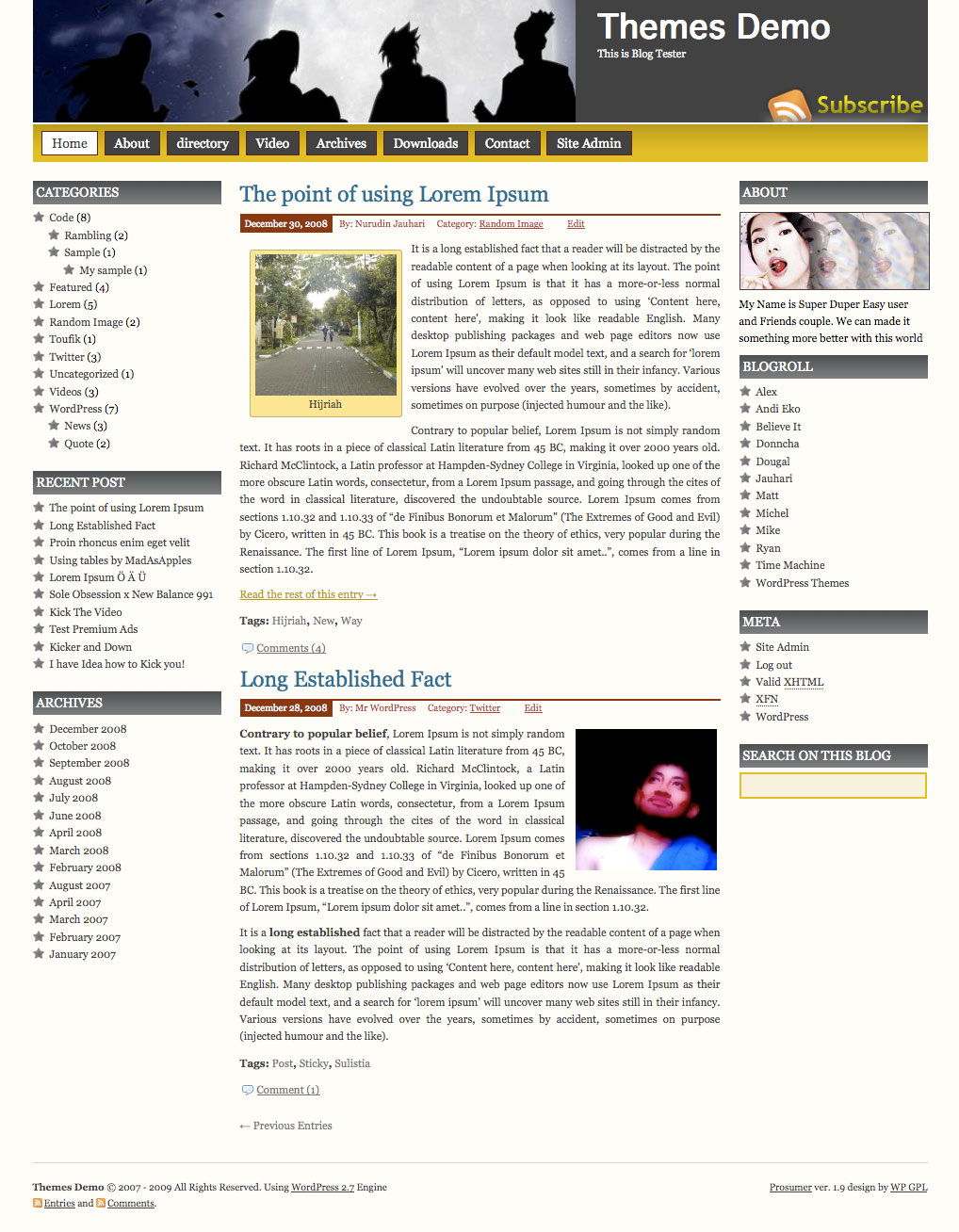
Prosumer WordPress Theme, is popular wordpress theme that develop by Nurudin Jauhari. After long time with Creative Commons license, Nurudin Jauhari decided to move to GPL Licence theme. Because of that fact. Nurudin Jauhari move theme hosting to WP GPL. We hope after Prosumer hosted on WP GPL, this theme will be got more user and better support.
[adsense]
What’s on Prosumer
- Right and Left Sidebar
- Widget Ready
- Custom Header
- Change About text via Admin Profile
- Threaded Comment
- WP-Comment
- Tested on WordPress 2.1.x, 2.2.x, 2.3.x, 2.5.x, 2.6.x and WordPress 2.7
Download
You can Download Prosumer on this post or from Free WordPress Themes Directory
- [download id=”4″]
- Prosumer on WordPress
Demo
Check Prosumer Demo for test drive this theme
Hi everyone.
Can anyone tell me how to change the favicon?. I have changed the image but it still shows the original Favicon (P) What else must be changed in order to show my image?
Thanks
You can follow this steps and I hope this clear your problem
I have just downloaded this theme and I have added my categories but it seems to be only displaying one categories when i have many. Can anyone tell me why this is
Great them but the sidebar.php is driving me crazy. I was able to replace the ‘you’ image, change the banner ‘about’ and the text below the ‘you’ image. I even created a link from the ‘you’ image but since yesterday, the link and banner changes are gone.
So I downloaded the sidebar.php file from my website to edit and there’s not even a reference to the ‘you’ image anymore
But it DOES display on my site !!
???
I am interested in adding additional menu items to the menu link below the header. I am not php savvy. Able to modify the css, but cannot find how to add additional links tho this horizontal menu bar. Can any assist me with this tack?
Hi,
I would like to know if you could help me to add a favicon to my website.
Thank you!
You can follow this steps
How do I switch the header text with the header image?
how could i change the banner
could I use banner pics i used in one other
of my related site
http://www.nephrojournalclub.com/
could I export import between the two patterns ?
thanks in advance
Jean-Marie
Hi, I am enjoying your prosumer theme. But would like to change some of the colors to match my splash site. Are they all keep in the style.css?
Is it possible to have the outer edges a different color like green?
Thanks.
Al
I saw someone else post this question also, and now I am having the same issue and I cannot seem to resolve it.
I am getting this error:
Line:5
Char:2
Error:’document.getElementByID(…)’ is null or not an object
Code:0
URL:http://theokieangler.com
This problem only happen on IE right?
Yes, I only see the error on IE. Thanks in advance for your help,
ward
Prosumer is a great theme. One question: Is there a simple CSS fix to horizontally ‘center’ the menu buttons?
Can you tell me more details, what you mean with Horizontally ‘CENTER’ the menu?
Top nav menu buttons in div #menuv are left justified. Can the buttons be center justified in CSS? Thanks. Al
Hello, wpgpl team. I replied 6/6 but haven’t heard further. Thanks. Al
Is that you mean Center menu like Freelance Jobs website?
Yes, the same.
For Prosumer theme, that possible, but for public released version I can’t do that for some reason such as, this header split layout, where header image on the left and the title on the right, so when we use Center menu, the design will not good.
But if you really want it, I can do this with my custom services, just sent me donations and let’s me help you to do this
like your Prosumer theme it has help me get started thank you a lot for it, i have one question can i remove from public view of the post the tags without loosing them for seo, if i can how do i do it??
again thanks a lot for creating the prosumer theme
I used the import process to bring my posts from a previous blog. Now the “Subscribe to RSS Feed” goes to a page listing all the posts that I imported rather than the RSS Subscribe page.
How do I correct that?
Hi. I am still working with thw fell &look of the theme…When it is ready will show you the result.
In th meantime I need a help with the header menu. Where do I change for not to see a page on the menu header?
I would like only to show all the pages in the left nav bar…Thanks
Is there way to add a page without out adding it to the header? For Example, If I want to have this sort of page structure:
Page A
Page 1
Page 2
Page 3…
Page B
Page 1..
Right now, when I hover over the link to page A, a drop down menu of 1/2/3. Can I avoid the drop down menu for 1/2/3 so that the user must go to page A to access 1/2/3?
I like your theme alot but my RSS side bar displays my website name and it overflows out of the tab. How do I make it to fit in the tab only?
Also my website name is cut off at the end in the header. How do I make the adjustment to fit nicely in the header?
Thank You!
and keep up the great theme developement!
michael
I recently updated to WordPress 2.8 and now I can’t customize my banner. Instead of being able to upload my own picture, the banner is completely black and I have been unsuccessful in trying to customize or change it in anyway.
Is this because I updated to 2.8? If so, are you coming out with an update to Prosumer?
I was check it and worked without any worries 😉
I’m running 2.8 now and my site looks fine to me. Not much help to you I realise, Shane, but I doubt the cause is 2.8 🙂
I’ve adjusted the overall layout of the theme to 90% of the screen width. How do i make the center column content fill in the empty space on a wide screen monitor? What code do I need to edit and where is it? Thank you.
I really like this theme. Thanks! I am also looking to add pages without the pages being an option in the navigation bar. I would also like to reorder the navigation bar.
I’ve been trying to figure out how to avoid having all pages go on the navigation bar as well. If you figure it out I hope you’ll come back to let me know. I’ve been striking out
Pages appearing or linking in menu bar
I’ve fixed this – for the Digg 3 Theme at least. Tested it in Firefox and IE and looks fine in both and the links work.
In the Header.php I deleted the lines for the pages I had added and inserted the wp_list_pages tag instead.
Here’s the code I used:
I’ve modified it to exclude a page that is a level below another page as including it affected the header alignment. The space after the first ‘=’ sign has the effect of excluding the title ‘Page’ which I don’t need to appear as it’s a menu bar not a list.
You can get more help from these links that explain what to do:
http://codex.wordpress.org/Template_Tags/wp_list_pages
http://codex.wordpress.org/Creating_Horizontal_Menus
Whoops, looks like the code I inserted got lost in transit. Follow this link to WordPress instead to see my answer. http://wordpress.org/support/topic/314247?replies=2