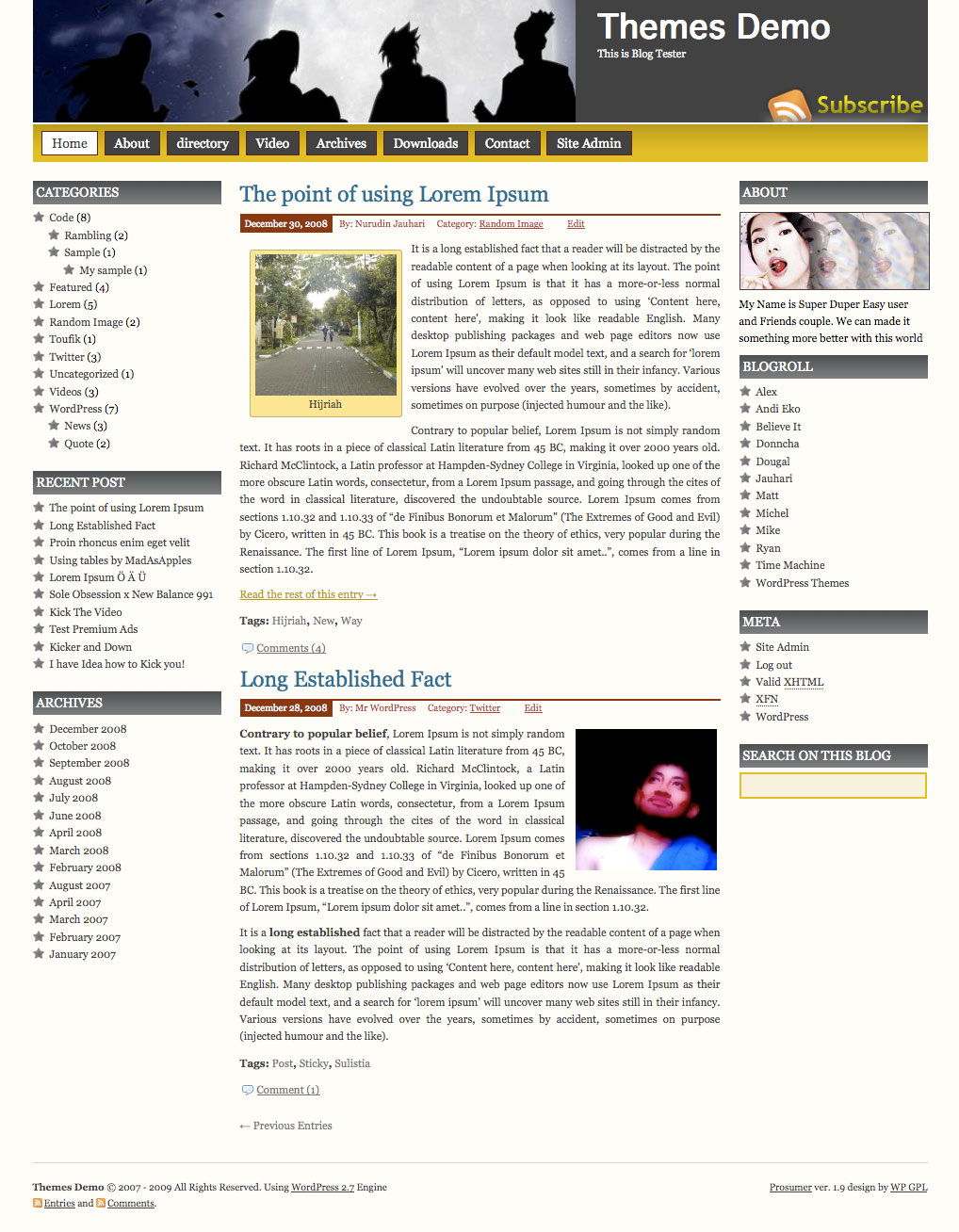
Prosumer WordPress Theme, is popular wordpress theme that develop by Nurudin Jauhari. After long time with Creative Commons license, Nurudin Jauhari decided to move to GPL Licence theme. Because of that fact. Nurudin Jauhari move theme hosting to WP GPL. We hope after Prosumer hosted on WP GPL, this theme will be got more user and better support.
[adsense]
What’s on Prosumer
- Right and Left Sidebar
- Widget Ready
- Custom Header
- Change About text via Admin Profile
- Threaded Comment
- WP-Comment
- Tested on WordPress 2.1.x, 2.2.x, 2.3.x, 2.5.x, 2.6.x and WordPress 2.7
Download
You can Download Prosumer on this post or from Free WordPress Themes Directory
- [download id=”4″]
- Prosumer on WordPress
Demo
Check Prosumer Demo for test drive this theme
Im having the same problem as Ward W relply 108.
I’ve been trying to figure out how to avoid having all pages go on the navigation bar as well. If you figure it out I hope you’ll come back to let me know. I’ve been striking out
Easy to keep selected pages (or posts too) from being displayed on Nav bar. Just go to Site Adm and click on Pages. Edit each page that you don’t want listed. In the Publish box on right, edit Visibiltiy. Selecting Private will prevent the page from being listed on the Nav bar or from being accessed by the public. Same for posts too.
Agallia (post #110),
I want the page to be public, but I don’t want in the nav bar. Basically I want the first level pages to show on the nav bar and not 2nd level, 3rd, etc
Sorry, can’t help on that one.
Hi Ward W, try to open your Prosumer FUNCTIONS.PHP and in around line 30, you’ll find this code
function j_globalnav() {

	$menu = wp_list_pages('title_li=&echo=0'); // Params for the page list in header.php

	echo str_replace(array("\r", "\n", "\t"), '', $menu);

}
Tweak this code become like this one
function j_globalnav() {

	$menu = wp_list_pages('title_li=&depth=1&echo=0'); // Params for the page list in header.php

	echo str_replace(array("\r", "\n", "\t"), '', $menu);

}
I hope this tips fix your problem
Good tip to limit dropdown menu level. Thanks.
Hello…..Great Theme it only took me 48 man hours to find one that I understand. I have read through the entire list of problems and the fixes everyone has provided. Which is a blessing in itself. My problem too is with the header. I changed the “head.jpg†file with my own image and everything went well. I understand that to change the “you.jpg†file will allow me to upload a new photo for that section. (unless of course I am mistaken about that!) however what I want to do is make the header one size instead of the two that are there so I can just upload the one image to span across the whole page. Is that possible? Anyone? Please?Help!!!
I have that problem as well. Someone please help!
Please Replaced original picture in some size and width for the best result
I am having the same problem as reply 107 -109.
is there a way to control the buttons in the upper menu-bar
Mas…piye merubah favicon tuh ya..
di theme mas yg laen bisa kok di theme ini gak bisa yo…?? 😀
I’d love to be able to change the colour of the links when I use them in the text. I’m sure that’s a simple adjustment in the code – does anyone know where I should look? (I’m not very knowledgeable about CSS but can follow instructions!)
Try going to Dashboard/Appearance/Editor. Select Stylesheet (style.css). Find the line (~212): .entry a {
color: #7a6c00;
}
Changing the color hex value 7a6c00 to another value will change the post link color.
For those of you trying to order the pages on the top nav bar, you can set the order for each page by going to the edit screen for each page and setting the order in the area on the right of the screen. You can hide pages by setting them as a child of another page and it won’t show up. For example, go to my page and see how Isabella has her own category but is not shown in the nav bar.
This is how I changed the About button to appear on the right hand side. It is new code, not something that is modified in the stylesheet.
#menuv li.page-item-94 a {
background: #FF36AB;
float: right;
padding: 3px 10px;
margin-right: 0.0em;
display: block;
}
Place it under the section that starts with:
/* Top Navigation Style
********************* */
/* Menuv
******************** */
I recommend getting the Firebug plugin for firefox… it makes editing and viewing changes easier to see without having to mod the css file directly.
Hope that helps.
Scott (#120),
The pages that I have set as a “child” are still showing up in the nav bar. When you hover over the parent page shown on the nav bar the list of 2nd level “child” pages comes up. Anyway to avoid that??
WPGPL Team, I have not been able to fit all my text into the Customer header portion (right side). Either my picture is pushing the text to the right or it is a little too big. How can I shift the text left or shrink it to fit into the header portion? I love your theme and am working on a reformat of my blog, so the link above does not direct you to my preview option. Thanks.
Hi,
I am trying to replace the head.jpg in “topi” with another jpg image. However it does not show me the new jpg. It shows me the original “head.jpg” image. How can I replace this?
Please help.
Thanks,
Swati Kale
I really love the look of your prosumer theme that I have installed.
I can’t seem to get gravatars to show in the comments with my test, even though I have switched avatars on in the WordPress settings. I’ve looked at your code, and it looks like it includes avatars. I know enough code to be dangerous, but not enough to really understand what is going on. Any pointers as to what I can check out?
I was check it on this post http://grantandjulie.com/emtt/2009/06/29/winds-of-change/ and the gravatar work without any worries
Thank you WPGPL team for having a look. It made me realise that it was my web browser. I was using IE 7, and wasn’t able to see the gravatar (could be some internet option that I’ve selected that was the problem). Anyway, after your response, I downloaded the latest Firefox and could see the gravatar too. Thanks again, it’s an awesome theme.
Really nice Theme, but 1.7 doesn´t work on my site:
“Fatal error: Only variables can be passed by reference in /var/srv/www/htdocs/web6/html/wp-content/themes/prosumer17/functions.php on line 107”
Didn´t get any solution till today? Anyone got an idea?
Hi Gerhard, please download Latest version
hi. I hv problem uploading pics when i write a post/page. Previously, I manage to upload pics but now I can’t. I choose add a media>choose file>from computer>choose files to upload but nothing happens.did i miss something?Pls help.
wordpress.org forums that answer a few of these questions like how to control pages in the nav bar
Hi, I found your theme today and changed my website to your theme. But I do not want the “home” tab in my navigation as I got another tab that acts as “home” page. So how do i get rod pf ot, and move all teh other tabs to the left.
Also teh tab “Site Admn” will that appears in everyones computer?
Thanks
Andrea
Site Admin only appear for registered user
Hi, thanks for your answer. I stehre a way of getting rid of the home tab and move all tabs to the left?
Thank you
Andrea
I seen this mentioned before, but can not find any comments to fix this.
I understand that it is only in IE that the error is shown but I would still like it fixed.
If there is no fixed, please so let me now.
I am getting this error:
Line:5
Char:2
Error:’document.getElementByID(…)’ is null or not an object
Code:0
Would you sent me some screen shot about this error?
Hello,
The website is at : http://university-life-success.com/wordpress/
The error is shown on the bottom left in the status bar.
Still no response on this error
🙁
I have just moved my wordpress to: http://www.university-life-success.com/
As you can see on the status bar bottom left, there is an error message.
Clicking on this error message gives the following details
Line:5
Char:2
Error:’document.getElementByID(…)’ is null or not an object
Code:0
URL:http://www.university-life-success.com/
Any ideas ??
I was check it and there are no error that I found.
You still use OLD WordPress please updated to the latest version
Hi,
I’m having trouble getting thickboxes to show up in this theme. I had installed the wp e-commerce plugin, and the images are supposed to open in a thickbox, but they don’t in this theme. I get the same errors that several others have gotten here, and I think it may be connected to my thickbox problem. I’ve tried changing themes, deactiviating plugins, and changing settings. Nothings worked. Here’s the error I’m getting:
Error:’document.getElementByID(…)’ is null or not an object
Any help with this is greatly appreciated!
Thanks,
Brent
Your URL please.. and let’s me check it
It’s http://www.alconservativeaction.org/cm
Thanks for the help!
I think everybody agree that this theme is MUST INSTALLED theme for many wordpress user.
Easy and Just Perfect!
I like the theme however I would like to know how I can rid the dark gray box in the header and replace it with a photo or logo. Any suggestions?
Show me with some screen shot about your problem please
How do I attach a screen shot in a blog? Do you have an email address? Or better yet, go to the site to see the header at http://www.firemaven.net. You will see the logo, a sailing photo and the dark gray space to the right.
Two Thumbs up for Prosumer! Still one of the best and most easily customized themes. I have never had any problems with it. Great theme!
In Prosumer the grey right block in the header reads “Theme Demo”. I’m attempting to input my own text however I cannot find where nor how to change it. We’d like to turn it into a clickable link as well. We’re using WP 2.8.4
TIA
Hey,
maybe you could help me.
I would like to change the header image of the theme to a 4-image rotating header, fading and in 3-4 seconds interval.
I found many possible plugins, but I could not insert the code in the php’s.
I found ‘head.jpg’ in style and in functions.
Could you please help me with that?
Thanks!
Péter