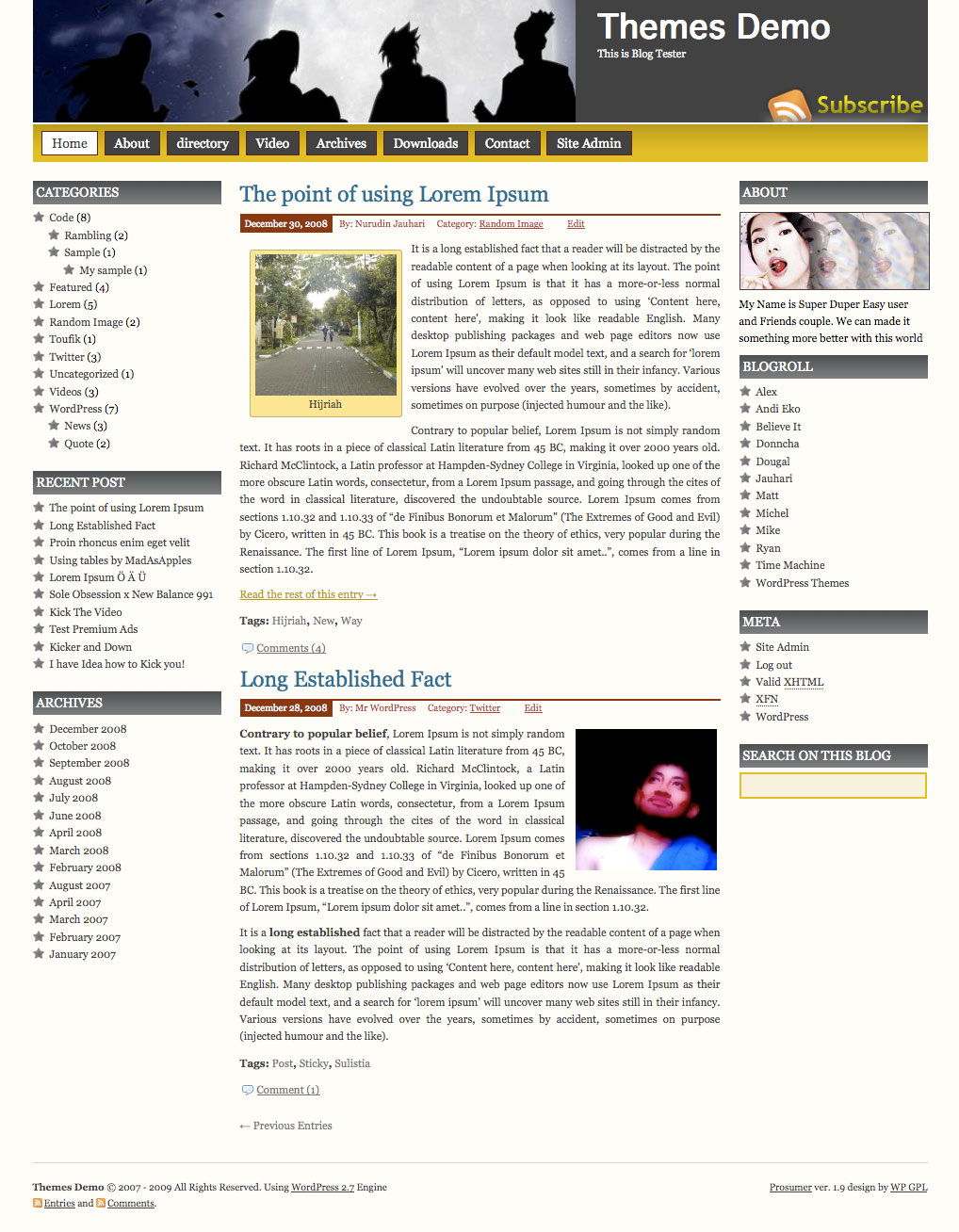
Prosumer WordPress Theme, is popular wordpress theme that develop by Nurudin Jauhari. After long time with Creative Commons license, Nurudin Jauhari decided to move to GPL Licence theme. Because of that fact. Nurudin Jauhari move theme hosting to WP GPL. We hope after Prosumer hosted on WP GPL, this theme will be got more user and better support.
[adsense]
What’s on Prosumer
- Right and Left Sidebar
- Widget Ready
- Custom Header
- Change About text via Admin Profile
- Threaded Comment
- WP-Comment
- Tested on WordPress 2.1.x, 2.2.x, 2.3.x, 2.5.x, 2.6.x and WordPress 2.7
Download
You can Download Prosumer on this post or from Free WordPress Themes Directory
- [download id=”4″]
- Prosumer on WordPress
Demo
Check Prosumer Demo for test drive this theme
Help me please?
Such a good theme dos not deserve that yello sign in the left bottom corner!
How can i solve the problem?
Faultdetails webpage
Subject: ‘document.getElementById(…)’ is empty or no object
Line: 4
Teken: 2
Code: 0
URI: http://henkteunissen.nl/wordpress/wp-content/themes/prosumer/src/menu.js
aq wong indonesia khususe wong jowo boys ayo gabng.
reigwan,mukip wes pokek~e khusus ank rons ayo gbng boys,
tk tngg almt boys n cwk**e rnas pisan ok
how to you add a custom favicon to the template …….. uploaded a favicon into hosting root directory but isn’t working ……. is their coding in the template putting in a different favicon?
Replace favicon.ico files on Themes folder with your new favicon
I like the theme a lot but how can I change the About image?
Thanks!
hello and hope you fine
thank you for this them im using it for an arabic blog
so is there any idea how to make it RTL?
or is there any RTL version for this amazing them
thank for help
Thanks for this beautiful theme. It works fine. Thanks a lot man, i really like it!
Problem solved!
Fault details webpage Subject: ‘document.getElementById(…)’ is empty or no object
Just by using an other prosumer version.
Thanks if you even gave my problem a little thought.
Kind regards, Henk
The problem is; which php file has to be overwritten? I have modified a few files like function.php to add a flash banner in the right column. It finally works so I dont’ want to mess with it.
Which .php file is causeing the ‘document.getElement….’ error?
So, your problem has been solved?
I am building my blog into my website, so downloaded your Prosumer theme which looks great. I added Twitter Pro widget on the right sidebar and it displays, but the heading is not showing because it is not contrasting to the background. I don’t know much about writing code, so don’t know where to fix it. I also can download code from Twitter for a widget, but I don’t know where to paste the code. Which file does it belong in?
I am receiving Done with errors on page when I load my website using Prosumer theme. I have the latest version 1.9.1. The error is the same as above.
Message: ‘document.getElementById(…)’ is null or not an object
Line: 4
Char: 2
Code: 0
URI: http://www.vickianderson.net/wp-content/themes/prosumer/src/menu.js
Could you please provide a fix?
Hello there Vicki,
I had the same errors on my page.
I downloaded an other prosumer version and checked in the src directory if the javascript file wasn’t there and simply exchanged the whole prosumer directory in my wordpress.
Success,
Henk – Nymegen-Netherlands
Thanks for the help, Henk, but I don’t know how to do that. I don’t see any other Prosumer theme and if I downloaded it, I wouldn’t know where to fix the java script. My computer friend said the owner of the theme needs to fix the js file. Otherwise, if we fix it and an update comes out, the error might be there again.
看了ä¸å›žä¸ç¤¼è²Œå•Š
Theme compatible WP 2.9.1 ?????
It’s Fully compatible, if you found any problem please let’s me know?
Hi there, I have done so much research on themes and this one is exactly what I like. There is one thing I want to ask you. Can I add automatically rotating images/photos in the middle column on top? And next to it, on the right side can I add a plugin or something to have a introduction video there?
Best regards, and keep making awesome themes like this one.
Hristo
Hi
Really like the theme and have used it on my new site. Just wondered if you could help me on the custom header? I adjusted the size so I could get a longer image, but wanted to keep the website name (this has gone when I changed the header image width) and remove the ‘subscribe’. I’ve been playing with the html in the theme function – is this correct?
define(‘HEADER_IMAGE’, ‘%s/images/head.jpg’); // %s is theme dir uri
define(‘HEADER_IMAGE_WIDTH’, 950);
define(‘HEADER_IMAGE_HEIGHT’, 150);
define(‘HEADER_TEXTCOLOR’, ‘FFF’);
Hope you can help – thanks
You need to edit on style.css too…
Excellent – for SEO purposes i want to remove the automatic title on each page (refers to page name). How do I do this please? thank you so much
Okey, I need theme it, because very cool. Tanks sir. 😆
Hi WPGPL team,
i test the prosumer theme and think about to use that for my news site. Is there a chance to add places for adverting banners over the Header (full size banner) and at the richt free space (for 2 Skyscrapers) ?
thanks Roy
Hi,
I have this theme and think it’s great, the only problem I have is that the “Home” tab appears twice at the top. Is this because I am using a Static Page as my default? I don’t have a clue when it comes to these sort of things so any help would be great.
Thanks
Andy
Hi Andy.. you can remove it.. please take a look on functions.php and header.php
There is a Home page created by the theme which does not show up on my list of pages to edit. I created a home page to serve as a static page, but now two identical “Home” pages are showing (both are updated when I edit the only that shows up in my page editor). Please advise: How can I get only one Home link to show on the navigation bar? I need details, I don’t write code.
Thanks for any help.
Very nice theme which we’re using for our blog site with a little modification; everything works great except the first/last post link can not be accessed; appreciate it if anyone has any idea what would cause it??? Thanks
http://blog.jlbn.net