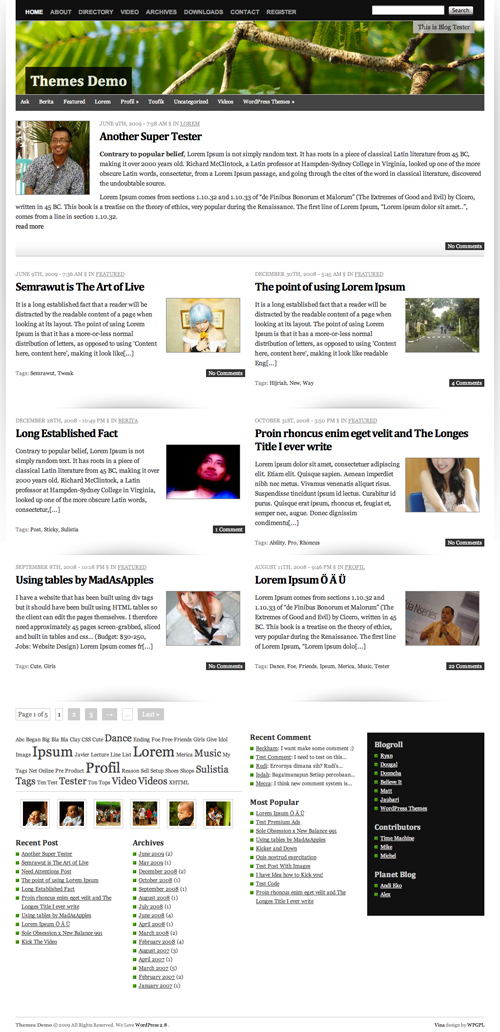
Vina WordPress Theme is extra ordinary layout wordpress theme. The behind story, why I gave the name of this theme Vina is, Vina name taken from my latest dream car Grand Livina, that why I want to make something easy to remember and useful for some one else. That why I create Vina wordpress theme.
On Vina, it try to use 1 line CSS Framework, this is powerful and simple CSS Framework all of the time, thanks for sharing this Framework 😉
This theme built in many nicely featured such as
[adsense]
- Auto Grabbed and Resized Image on the fly
- Nicely 2 Columns content with latest featured post
- A lot of widget
- Page Comment
- Grid Based layout
- Threaded Comment
- Work Perfect on WordPress 2.7 and WordPress 2.8
- Extra Ordinary layout
- Magazine Style
- Nicely Typography
- Header Effect with jQuery
- Image Header
- FlickrRSS Plugin
- Popularity Contest Plugin
- and many many more
Download Vina
You can download Vina on this server or on WordPress Theme extend
- [download id=”9″]
- Vina: Free WordPress Themes directory
Localization
- Vina in Indonesia version by Ivan Lanin
[download id=”15″]
Vina Demo
You can check Vina WordPress Theme demo
If you enjoy and like Vina WordPress Theme, you can help me spread this theme.
Change Logs
1.0 : First Public Released
1.1 : Fix Minor Error on the Header
1.2 : Fix Minor Problem
1.3 : Fix Auto Grabbed image and Hidden No Image when no image uploaded and Search page and add RSS Icon
How To and FAQ / Vina instructions
Many blogger ask the some question, and I tried to explain more clearly as I can do,
No Image Problem?
Vina is built in Auto Grabbed image, this code is searching image files on the content and display on the front page with TimThumb. But if you want using custom field, it’s easy just put you image url on custom field “thumbnail” (available on version 1.2 and newer) and the image will be used for image post in the front page, and if the post without any image, the auto grabbed image will be switch off 😉
Change Custom Image Header
To change default image header, go to Apperance > Custom Header and upload your own image.
Future Released
- Theme Options (hola)
- Tweak Single Post
- Have suggestion? (leave some feedback on this post)
it is a best theme. thanks for this
Hi, I’m using your theme and I do like it, I just can’t get the thumbnails in the excerpts on the home page to resize. Instead it tends to show just a corner of the image. Help?
Very nice theme 🙂 I just have a problem: the latest post is entirely shown in the home page, how can I set the theme to show the first paragraph and the “read more” link like in the demo?
In IE9 the right aligned “0 Comments” box has the wrong font-colour. It appears black but should be white.
Vina comments also don’t respect the wordpress date format settings. A workaround is to change the theme function “list_comment” so that it uses get_comment_date() instead of get_comment_date(‘M.d.Y’)
We hope fix this issues on future release
Thanks. I’m thinking there are some things we can do to speed up the rendering of the theme too:
-don’t use @import
-too many external css files
-navi.css could be inlined since it is only 6 css rules
-move equalheights plugin to inline js since it is so small
Just some thoughts!
I can use this theme for commercial use?
excellent wordpress theme,,
free but like premium theme
Zune and iPod: most people compare Zune with Touch but after seeing how slim and surprisingly small and light it is, I consider it to be a rather unique hybrid that combines qualities of both the Touch and the Nano. Its colorful and lovely OLED screen is slightly smaller than the touch screen but the player itself feels a bit smaller and lighter. It weighs about 2/3 as much and it is noticeably smaller in width and height, while being just a hair thicker.