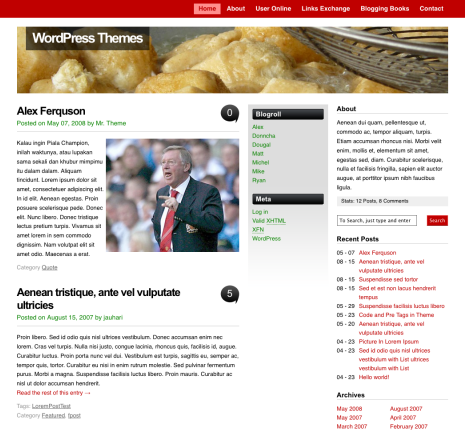
vita WordPress Theme is unique style. This theme is really clean layout and support a lot of featured. The featured that you’ll got on vita is
- Custom Image Header
- Widgets
- Comment Threaded
- Gravatar
- Separate Comment & Trackbacks / Pingback included counter
- Fix Width
- GPL licensed
[adsense]
This is our second themes that hosted on WPGPL.com, before hosted on this site. This theme is hosted on JAUHARI.net, but for some reason such as separate themes version betwen GPL and Non GPL theme, Nurudin Jauhari decided to move this theme on WPGPL.com.
Download Now
You can download vita on this url below
- [download#2]
- WordPress Themes Directory
Demo
You can check the vita demo now
F. A. Q.
How To Change About Text?
Open functions.php and find this code
	<li class="about boxr">
<h2>About</h2>
Aenean dui quam, pellentesque ut, commodo ac, tempor aliquam, turpis. Etiam accumsan rhoncus nisi. Morbi velit enim, mollis et, elementum sit amet, egestas sed, diam. Curabitur scelerisque, nulla et facilisis fringilla, sapien elit auctor augue, at porttitor ipsum nibh faucibus ligula.

Stats: <span class="catr"><a title="<?php global $numcmnts;echo $numcmnts;?> Post">
< ?php global $numposts;echo $numposts; ?>
</a> Posts</span>, <span class="comr"><a title="<?php global $numcmnts;echo $numcmnts;?> Comments">

< ?php global $numcmnts;echo $numcmnts;?>
</a></span> Comments</li>
Then you can edit/replace on this text
Aenean dui quam, pellentesque ut, commodo ac, tempor aliquam, turpis. Etiam accumsan rhoncus nisi. Morbi velit enim, mollis et, elementum sit amet, egestas sed, diam. Curabitur scelerisque, nulla et facilisis fringilla, sapien elit auctor augue, at porttitor ipsum nibh faucibus ligula.
Change Logs
1.0 : First released
1.1 : Fix custom image header options
1.2 : Add Pingback / Trackback URL
1.3 : Fix Comment Problem, add comment on Page and Add wp-smiley style.
1.4 : Fix Tag Layout, and Enable Threaded Comment (WordPress 2.7) [8 January 2009]
1.5 : Move Themes Host and fix some issues [15 March 2009]
1.6 : Fix Page comment problem and WP Caption [9 July 2009]
If you found any bugs or problem regarding this theme, you can leave some comment on this post.
Hello,
I love this theme, however the red bar at the top is wrapping and overlapping the “home”, “about”, “register” when viewing on windows IE 7.0.
How can we fix this?
Thank you.
@hapa bento
I had the same thing with IE. Try to remove the search widget from your widget list. A search bar is automatically added to your blog with this theme. Once I removed it, the red menu at the top was displayed correctly in IE.
@Tom Brussels
Thanks! It did the trick!
I added categories to the navigation bar at the top. How do I get the posts to display in those categories?
Hi,
Vita is a beautiful theme for wordpress. I have used this theme for one of my client. The problem is sidebar’s are not shown in the Internet explorer. But it is showed in Firefox, Chrome and all the other browsers. Would you please let me know if have i have missed something here.
Thanks in advance and wish you a happy new year all.
Regards,
venkatesha
Nice Post! I really like these tools and wish you the best of luck with the themes.
I’m having a problem with images and how they show up. When on the home page, the images are not resized and only parts of the image shows up in the image box or else the image box is huge and my image shows up as very small. It looks very sloppy when you look at all images on the home page. How do I fix?
thanks.
gary
Hi, How do I make the custom image header clickable? Thanks.
Hi, I wonder if you might be able to help me with an issue? I am using Safari and the post titles are not correctly wrapping onto the second line, instead they are hitting into the little baloon graphic that has the number inside and getting obscured by it, the graphic is actually appearing on top of the post title text.
Firefox is OK, the post title is wrapping earlier and there is a space between the last word and the graphic.
Is there any way to solve this or to change the size of the post title font maybe this will force them not to clash like this? It would be best if it just displayed correctly in Safari?
Many Thanks
Simon
Many Thanks
Simon
This theme is not correctly displaying in Safari, there is no left margin whatsoever and if the browser is not stretched enough the left text touches the left side of the browser, this is in addition to the above issue with word wrap, I hope there is a solution to this because this is a nicely designed theme and it would be shame if I have to ditch it because of poor browser compatibility performance . . . .
How can I remove the “About”/”Recent post” widgets off the far-right sidebar? Is this possible.
Of course is it possible.. you need to edit sidebar.php or download our update version later
Trying to add thumbnails to my “Listen” page: http://themikieshow.org/?page_id=66. Each time I try to add thumbnail word wrap puts next paragraph next to thumbnail. Will send a screen shot of the problem if you need. Any help? Thanks.
re design vita
I love it there is just something weird with the recent posts function – a search bat shows up at the end, it shouldn’t be there. how can I change it? I want to use the WP resent posts widget.
It’s look like your Second Widget area didn’t display? or you didn’t use it?
Recent entries clear desire, as I can do? or move it down, please tell me how to do it if they can not find like, thank you very much
With everything that seems to be developing throughout this particular area, your perspectives are quite exciting. However, I appologize, but I can not subscribe to your whole plan, all is exciting, nonetheless. It seems to everybody that your remarks are generally not completely justified and in reality you are yourself not even completely convinced of your argument. In any event, I did take pleasure in examining it.
So that is absolutely an excellent cause to get access to this bot now, even though it is nevertheless obtainable.
Each of them has a different function according to the intensity of the misspelled keywords. Two: Research different services. Assuming that you are going to hire someone to do it for you, the next step is to research as many different services as possible.
Forgetting to write for an audience is one of the biggest mistakes that bloggers make. Tests with a model like Page – Rank have shown that the system is not infallible.