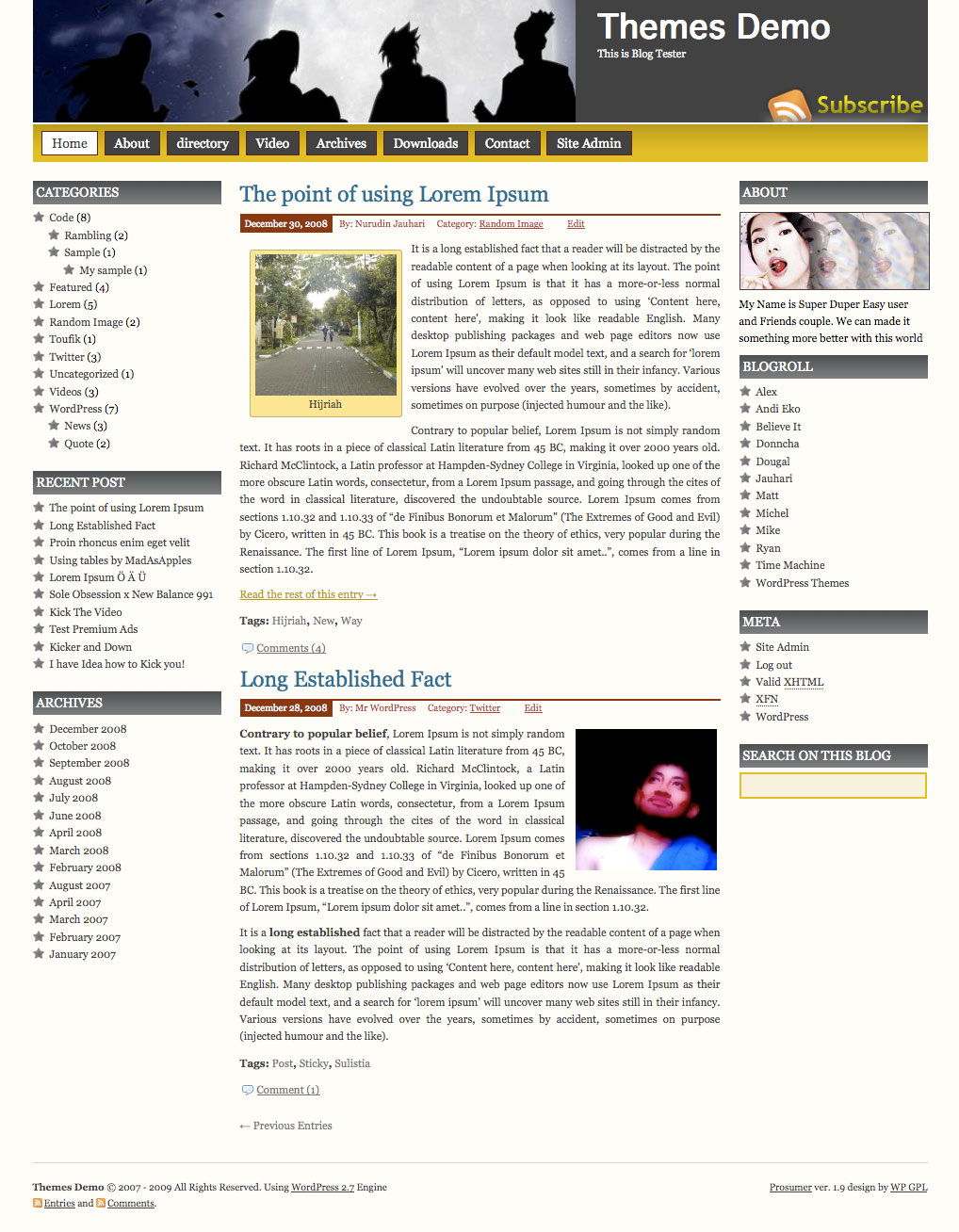
Prosumer WordPress Theme, is popular wordpress theme that develop by Nurudin Jauhari. After long time with Creative Commons license, Nurudin Jauhari decided to move to GPL Licence theme. Because of that fact. Nurudin Jauhari move theme hosting to WP GPL. We hope after Prosumer hosted on WP GPL, this theme will be got more user and better support.
[adsense]
What’s on Prosumer
- Right and Left Sidebar
- Widget Ready
- Custom Header
- Change About text via Admin Profile
- Threaded Comment
- WP-Comment
- Tested on WordPress 2.1.x, 2.2.x, 2.3.x, 2.5.x, 2.6.x and WordPress 2.7
Download
You can Download Prosumer on this post or from Free WordPress Themes Directory
- [download id=”4″]
- Prosumer on WordPress
Demo
Check Prosumer Demo for test drive this theme
To be a little more clear, we only have this problem in Firefox and Chrome but not in IE7/8, so if using either Firefox or Chrome to go to our blog, you will not able to open the first post
http://blog.jlbn.net
If you have any idea what’s wrong or what would cause it, please post here. Thanks
I’m working on a blog for a new client and I’ve installed your template. I’m trying to edit the About (you.jpg) photo. They have the free WordPress blog so it isn’t installed on their domain so I can’t just overwrite the you.jpg image with a new one or can I. I’m new to editing WordPress tempates, so if you could point me to the correct place to point the you.jpg to the new one, it would be greatly appreciated. Thanks for your help.
Hi, I’m new to WordPress blogs and am working on a client’s site. I successfully installed your template and changed the header image. I’m trying to change the About image. I’m guessing that because this is a WordPress hosted blog, I don’t have access to any directories via FTP. So how do I overwrite the “you.jpg” image with one of my own? Is there a place in the template code that I can change the path to point to a new image?
http://blogs.virginiahorse.com/
Your help is much appreciated! Thanks,
Tony
Love the theme and am getting good comments about it. Only problem is that I want to limit the ‘depth’ of the dropdown menu when the cursor hovers over the parent page in the nav bar. Can you help me fix this? I want to limit it to 4 subpages showing. Thanks.
Hi,
Love your theme (Prosumer).. But.
I’m getting the js error reported by someone earlier, wondering if there are any fixes?
If I view the actual menu.js file I get:
Line: 14
Char: 1
Error: ‘window’ is undefined
Code: 800A1391
Source: Microsoft JScript runtime errror
If I view the web site where this is installed (www.moneysure.com)
I get:
Webpage error details
User Agent: Mozilla/4.0 (compatible; MSIE 8.0; Windows NT 6.1; WOW64; Trident/4.0; SLCC2; .NET CLR 2.0.50727; .NET CLR 3.5.30729; .NET CLR 3.0.30729; Media Center PC 6.0; .NET CLR 1.1.4322)
Timestamp: Sun, 23 May 2010 04:30:30 UTC
Message: ‘document.getElementById(…)’ is null or not an object
Line: 4
Char: 2
Code: 0
URI: http://www.moneysure.com/wp-content/themes/prosumer/src/menu.js
Any help will be appreciated! Thanks.
I am using this theme and everything is working great except I keep getting an error when i try to display the comments. I keep getting the following:
Warning: call_user_func(list_comment): First argument is expected to be a valid callback in /html/wp-includes/comment-template.php on line 1205
Thoughts?
Have you tried to redownload the Themes?
Two things: The RSS subscribe button in the header image doesn’t work. Also, the widget heading for an RSS feed doesn’t show up (text color must be set to black or grey). Where do I fix text color, and if the RSS subscribe doesn’t work, how do I get rid of it?
Once you start changing the widgets on the prosumer theme, the “About” stock widget, the one with the picture that shows your biographical info in the upper right side bar, disappears. I was able to change the picture so it doesn’t show the stock one. But now I can’t use it, since it disappeared. There is no “About” widget in site admin. So how do I add this back, while still being able to keep the right and left sidebars the way I want them?
I don’t (and I think this is the default) have any widgets in “Sidebar 2†in the Site Admin. If you remove all the widgets placed there, does the About section return?
Hi Chris, How were you able to change the stock pic under the “About” widget? I’ve been playing around on the dashboard and under my user profile to no avail.
If I have more than 1 article in the blog, the right and left columns disappear in IE6/IE7/IE8. With other browsers no problem. Any solution? brgds Arno
I’m trying to find out how to change the Horizontal Menu bar color located under the header. I’ve looked over every page in the editor, but can’t seem to find out how to do this.
Welcome! Wonderful theme, I used it here – http://www.mesoeurasia.org
But one – anywhere in the menus, archive, the list of posts passages highlighted with an asterisk, but only in the widget with comments that do not. How to make and there in the list of comments they shared with an asterisk?
Hi – does anyone know how to limit the number of posts that appear on the left hand side and also how to change the favicon (or where to find it?:-)) Thanks, John. Nice theme btw
Change Favicon is easy.. replace favicon.ico on theme folder
Hi Nurudin, glad to fill this comment. I use your themes for my website..very good and very nice. i Can change the header so easy. i Hope you always give update news for these themes.
Very very thanks..:)
Hope you can help me, I have just installed the theme, and on the right sidebar where my Twitter feed is, the text is dark grey (You can almost not see it say “Latest Tweets”) while the other ones are white. What can I do? Thank you for your help in advance. /Maria