Author Archive


Analytics360 WordPress Plugin

Posted 07 Nov 2009 — by WPGPL Team
Category WordPress Plugins
Analytics360 WordPress Plugins

Analytics360 WordPress Plugin

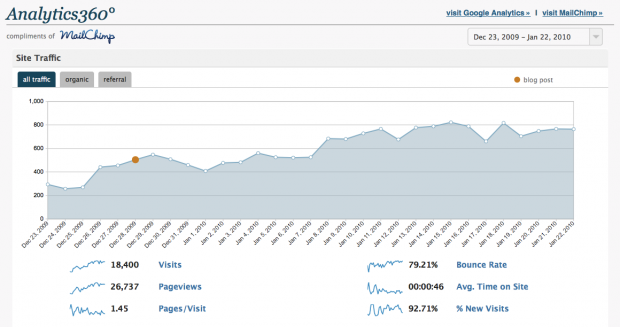
Analytics360 is WordPress plugin, developed by Crowd Favorite, why this plugin become my favourite, because Analytics360 display your Google Analytics data from your WordPress Dashboard. This is another reason why I choose Analytics360 as my web traffics statistics

Site Traffic

Icon TrafficVisualize your site’s traffic trends and see how blog posts and email campaigns affect overall traffic. You can also isolate traffic coming directly to your site from email campaigns with the “campaign traffic” tab.

List Growth

Icon ListgrowthChart the growth of your mailing list over time. Compare new and existing subscribers. And if you’ve got multiple lists, see how they stack up to each other.
Read the rest of this entry »

KB Advanced RSS Widget WordPress Plugin

Posted 30 Sep 2009 — by WPGPL Team
Category WordPress Plugins

KB Advanced RSS Widget: Gives user complete control over how feeds are displayed, this is the total solutions for replacing you default RSS Feed widgets for you WordPress Blogs.

Why I recommended KB Advanced RSS Widget? it’s because default RSS Feed by WordPress is not enough, there are some limit on the default featured. But after I installed KB Advanced RSS Widget and test on my WordPress Blog, the problem has gone. I can setup how many and how the content will be displayed. All Feed under controls with easy ways. Read the rest of this entry »

WP Greet Box

Posted 02 Sep 2009 — by WPGPL Team
Category WordPress Plugins

Until today, WordPress.org is the most wanted Publishing platform on this planet, easy to use, a lot of plugin and themes is the most reason why using WordPress. With WordPress you can create wonderful blog or some CMS. And today I will intrude another GPL Plugins, the name of this plugin is WP Greet Box, this plugins is really unique and built with many special ability.

PollDaddy

Posted 11 Aug 2009 — by WPGPL Team
Category WordPress Plugins

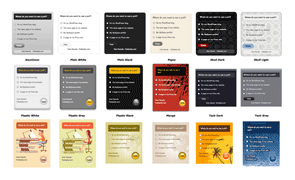
poll-daddyIf  you need some poll on your website or blog,you should try Poll services by PollDaddy.com, After automattic company acuired PollDaddy, some user created incridible plugin to integrated PollDaddy with WordPress.

I was tried this plugin on WPGPL.com and so far so god. This is some information that I can share to all of you about this plugin. Read the rest of this entry »

Yet Another Related Posts

Posted 20 Jul 2009 — by WPGPL Team
Category WordPress Plugins

I have searching so many GPL WordPress Plugin for related posts for my blogs. I was found some tips by adding directly code on the themes, and I was try to search how to add related post ability using some plugins and this is some of my list of Related Posts plugin that available on the net

Read the rest of this entry »

FeedBurner FeedSmith WordPress Plugin

Posted 11 Jul 2009 — by WPGPL Team
Category WordPress Plugins

feedburner-feedsmith-plugin

If you are big fans and user of FeedBurner, you should download FeedBurner FeedSmith, because this plugin is the perfect plugins to automatically redirect your feed into FeedBurner.

FeedBurner FeedSmith is Originally authored by Steve Smith, and current version has been developed by Google, if you need more details about how to use this plugin you can follow on this page.

For the best results using FeedBurner with your self-hosted WordPress site, google recommend the FeedBurner FeedSmith plugin. The plugin will detect all ways to access your feed (e.g. http://www.yoursite.com/feed/ or http://www.yoursite.com/wp-rss2.php, etc.), and redirect them to your FeedBurner feed so you can track every possible subscriber. It will forward for your main posts feed and optionally, your main comments feed as well. Read the rest of this entry »

Free WordPress Theme: Vina

Posted 25 Jun 2009 — by WPGPL Team
Category WordPress Themes

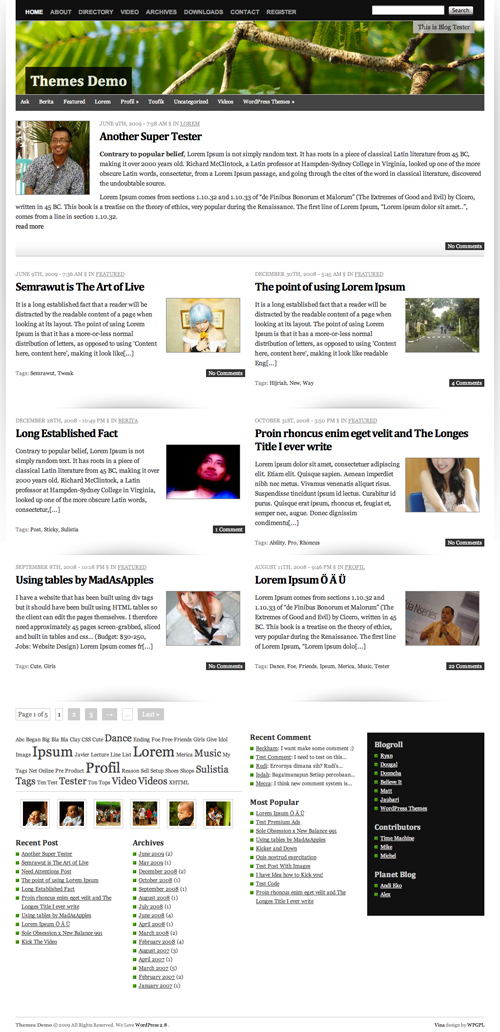
vina-wordpress-theme

Vina WordPress Theme is extra ordinary layout wordpress theme. The behind story, why I gave the name of this theme Vina is, Vina name taken from my latest dream car Grand Livina, that why I want to make something easy to remember and useful for some one else. That why I create Vina wordpress theme.

On Vina, it try to use 1 line CSS Framework, this is powerful and simple CSS Framework all of the time, thanks for sharing this Framework 😉
Read the rest of this entry »

Front-end Editor WordPress Plugins

Posted 20 Jun 2009 — by WPGPL Team
Category WordPress Plugins

front-end-editor

Front-end Editor is WordPress plugins for  Ajax Lovers. Why I said this is for Ajax Lovers. Because Front-end Editor is live edit your content from you fronpage blog. This plugins really easy to set and more easy to use.

Front-end Editor also support localization, current version is default support 8 languages, there are Danish, Dutch, French, Italian, Japaneze, Norwegian, Spanish and Swedish you can add your country languages too, you can read this instructions Read the rest of this entry »

Page Links To WordPress Plugins

Posted 03 Jun 2009 — by WPGPL Team
Category WordPress Plugins

page-links-to

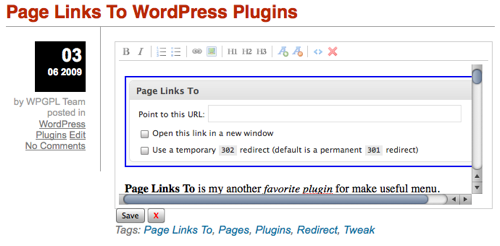
Page Links To is my another favorite plugin for make useful menu. Menu that build with wp_list_pages(). With Page Links To plugins we can make new page but the page doesn’t have any content, because we will setup the point url will be. So when the pages is hover, the page will not go to pages on your wordpress, but the page menu will go to your point url. For me it’s really useful. I hope for you too.

Read the rest of this entry »

How To Change Favicon on My Themes

Posted 31 May 2009 — by WPGPL Team
Category WordPress Tricks

favicon

Have you ever know, almost my Free WordPress Theme, contain small icon that display on the url bar. This icon is small sign that more easy to indicate which web address that you currently view or easy to manage if you have a lot of tabs opened together.

This Post will show you how to change Original Theme Favicon, with your own favicon. To change this icon is simple. You must have the favicon that you want to use. You can made it with Adobe Photoshop and looking around the net some favicon generator. After your favicon ready, all need to do just replaced my original theme favicon that usually placed on MyThemeName/favicon.ico with your favicon. Read the rest of this entry »